
Spring Sale Limited Time 70% Discount Offer - Ends in 0d 00h 00m 00s - Coupon code = simple70

Pass the Adobe Workfront AD0-E911 Questions and answers with Dumpstech

Exam AD0-E911 Premium Access

View all detail and faqs for the AD0-E911 exam

Practice at least 50% of the questions to maximize your chances of passing.
Viewing page 3 out of 3 pages
Viewing questions 21-30 out of questions
Questions # 21:

Two team members are assigned to a task that is expected to start this Tuesday based on the predecessor and the task constraint, but the Planned Start Date is showing as this Friday.

Why may this be the case?

Options:

A.

The primary task owner has time off logged in Workfront.

B.

The team needs to review the task before confirming the start date.

C.

The task duration and planned hours are set to begin on Friday.

Questions # 22:

A team lead wants to see all hours that have been logged this month by members of the team lead’s home team, organized by project. How should the team lead create this view?

Options:

A.

Navigate to a specific project and open the Hours tab. Filter the view by Owner > Home Team ID > Equal > [Name of Home Team] and Hour > Entry Date > This Month. Repeat on all projects in which team members are assigned.

B.

Visit the Reports area and create a new Hour report. Add the filters for Owner > Home Team ID > Equal > [Name of Home Team] and Hour > Entry Date > This Month. Group the results by Project > Name.

C.

Visit the Reports area and create a new Hour report. Add the filters for Hour > Entry Date > This Month and Project Status > Equal > Complete. Group the results by Project > Name.

D.

Visit the Teams landing page and on the Workload Balancer select the users ' home team. Add the user filters for Task > Actual Start Date > This Month, click Apply. Update view settings and toggle on the Show remaining time setting.

Questions # 23:

An assignee clicks Work On It for a task, and a new finish date appears on the task while the original planned finish stays the same.

What does this new date communicate to the project manager?

Options:

A.

It indicates that the assignee’s finish date is wrong and should be ignored.

B.

It indicates that the assignee’s finish date replaces the Planned Completion Date.

C.

It indicates the assignee’s own estimate of when they expect to finish the task, which can differ from the Planned Completion Date.

Questions # 24:

A task won’t close when trying to select “Complete.”

Which two reasons block someone from being able to close a task? (Choose two.)
Options:

A.

A predecessor task is “In Progress.”

B.

The subtasks are not “Complete.”

C.

The task is a predecessor to another task.

D.

The task is assigned to a job role and not an individual user.

E.

The project is “Active.”

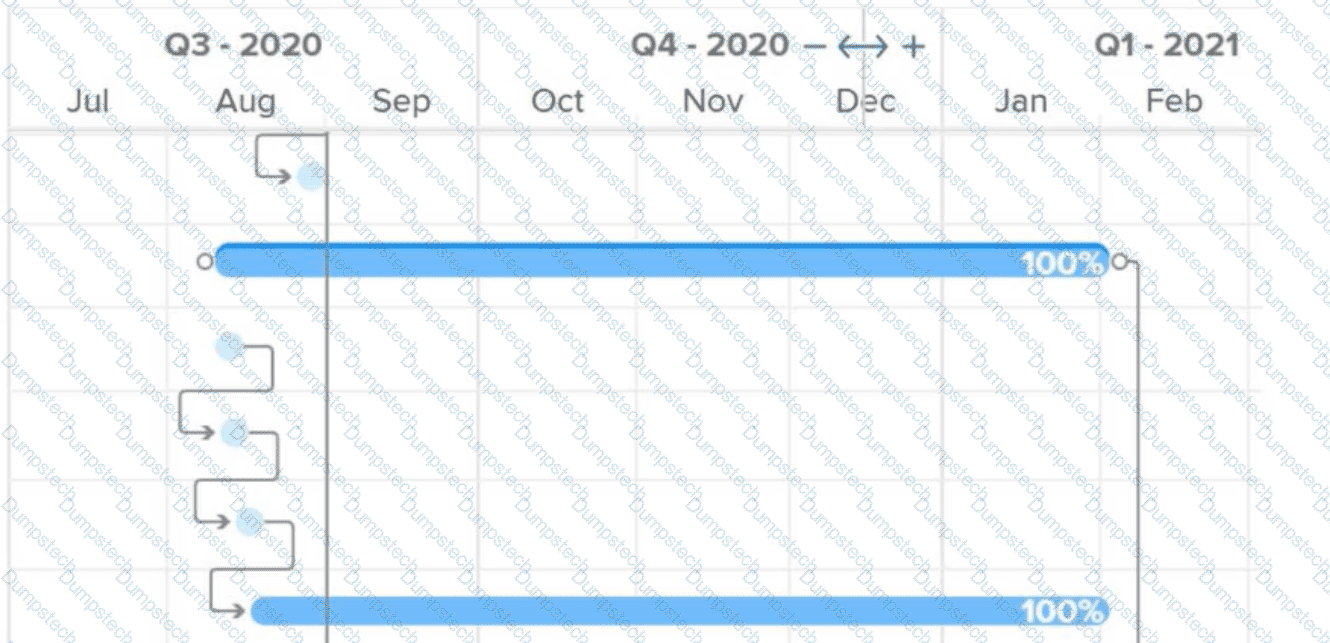
Questions # 25:

Question # 25

What do the connector lines between tasks in a Gantt chart represent?

Options:

A.

Critical path

B.

Multiple assignments

C.

Predecessor relationship

Questions # 26:

A user wants to notify a team of a new work request for them to work on.

Where would the user set the team so they are notified of the new work request?

Options:

A.

Request > Request Details

B.

Request > Updates

C.

Request > Assignments

Questions # 27:

A project manager has set up and launched a new project for an annual marketing campaign.

Where can the project team locate their work requests?

Options:

A.

Email, Workfront Home, Project tasks list

B.

Email, Automatic Reminders, Workfront Home

C.

Event Notifications, Approval processes, Email

Questions # 28:

Which field is used to create a milestone step on a milestone path in the Setup area?

Options:

A.

Status

B.

Description

C.

Key

Viewing page 3 out of 3 pages
Viewing questions 21-30 out of questions