
Black Friday VIP Hour Limited Time 75% Discount Offer - Ends in 0d 00h 00m 00s - Coupon code = simple75

Pass the EPIC Epic Cogito Fundamentals COG170 Questions and answers with Dumpstech

Exam COG170 Premium Access

View all detail and faqs for the COG170 exam

Practice at least 50% of the questions to maximize your chances of passing.
Viewing page 9 out of 11 pages
Viewing questions 121-135 out of questions
Questions # 121:

A cardiologist wants to identify all patients with uncontrolled hypertension who had an ER visit in the past 6 months. What ' s the best approach?

Options:

A.

Filter by encounter type = ER and diagnosis = hypertension, add a slice for BP status

B.

Create a component and assign a report

C.

Use a dashboard and personalize layout

D.

Apply a badge to highlight patients

Questions # 122:

A Cogito SQL report groups patient visits by procedure code with multiple summary functions and requires a trace log. Which configuration is correct?

Options:

A.

Use Clarity as the data source, group via the Display tab, and enable trace logging.

B.

Build in Chronicles, configure summary targets, and disable ad hoc searches.

C.

Create in SlicerDicer, add procedure code slices, and enable security points.

D.

Use Caboodle, assign Action Groups, and configure Threshold Overrides.

Questions # 123:

A hospital needs to benchmark its surgical case cancellation rates against Epic community data in a Radar dashboard, with drill-down to case details and dynamic thresholds based on surgical specialty. Which configuration achieves this complex requirement?

Options:

A.

Use Dashboard Metrics with Epic ' s benchmarking database, configure a Hyperspace activity link, and enable Specialty-Based Dynamic Thresholds in the Component Editor.

B.

Create a SlicerDicer session with a benchmarking filter, enable drill-down, and add specialty-based slices for thresholds.

C.

Build a Reporting Workbench report with community benchmarking, link to the dashboard, and configure specialty-based summary targets.

D.

Configure the Analytics Catalog to query Epic ' s Clarity database with drill-down and specialty filters.

Questions # 124:

What ' s the benefit of using a Report Model over building from a template directly?

Options:

A.

It includes predefined logic and guidance from Epic to fill in local values

B.

It automatically fills in patient data

C.

It creates security access

D.

It prevents report expiration

Questions # 125:

An analyst needs to restrict a Radar dashboard to quality assurance staff. Where should this be configured?

Options:

A.

The dashboard ' s Access form in the Report Group settings.

B.

The component ' s security points in Hyperspace.

C.

The SlicerDicer session ' s user permissions.

D.

The Analytics Catalog ' s visibility settings.

Questions # 126:

A Cogito SQL report, sourced from Clarity, groups inpatient stays by ward and calculates average length of stay, with a trace log. The report is restricted to ward managers. Which configuration is correct?

Options:

A.

Use Clarity, group via the Display tab, enable trace logging, and assign a Report Group for ward managers.

B.

Build in Chronicles, configure summary targets, disable trace logging, and set security points.

C.

Create in SlicerDicer, add ward slices, enable ad hoc searches, and restrict via Action Groups.

D.

Use Caboodle, assign user roles in Hyperspace, and configure Dynamic Thresholds.

Questions # 127:

Based on the screenshot from Record Viewer, what is the response type of the item 94 – OTHER COMMUNICATION DEVICES.
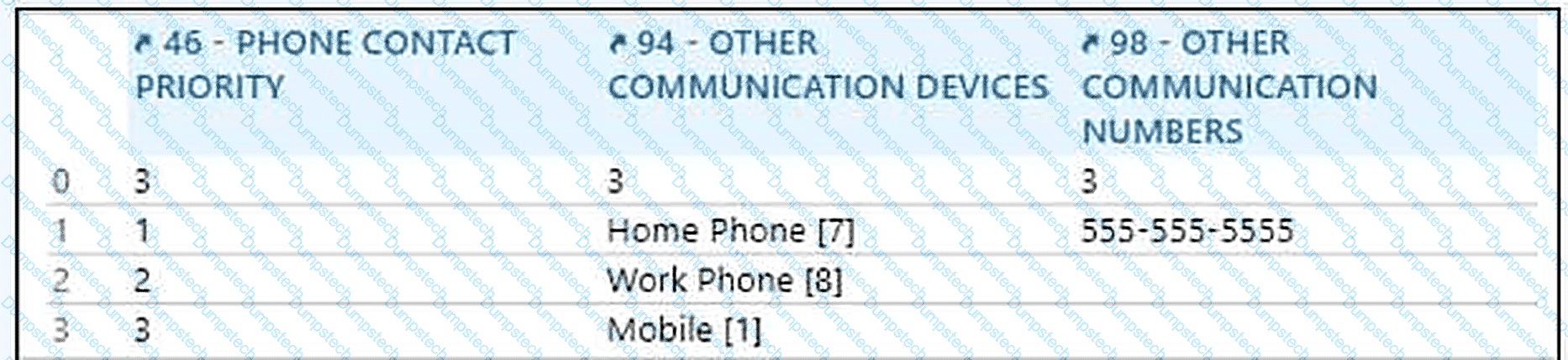
Question # 127

Select one of the following (1 PT)

Options:

A.

Overtime

B.

Lookback

C.

Single Response

D.

Related Group

Questions # 128:

A dashboard component with a Hyperspace activity link fails to open the Patient Follow-Up activity for non-admin users, despite a valid activity descriptor and Dashboard Resources as the data source. Admins can access the link, but non-admins report no data or interactivity. What are the causes, and how should they be fixed?

Options:

A.

Non-admin users lack security points for the activity and component interactivity; update their security class to include the necessary permissions.

B.

The component ' s data source is misaligned with the SlicerDicer session, and the session is outdated; align the data source and rebuild the session.

C.

The dashboard ' s Layout form restricts non-admin interactivity, and the data is not in Caboodle; enable interactivity and schedule ETL processes.

D.

The activity descriptor is not registered in Chronicles, and the session uses Clarity; register the descriptor and switch to Caboodle.

Questions # 129:

Operational reports must have which of the following characteristics? Select all that apply.

Options:

A.

Time-sensitive

B.

Easily accessible in Hyperspace

C.

Small and focused on individual users

D.

Run through the Clarity nightly batch process

Questions # 130:

To create an interactive dashboard with a component that launches a Hyperspace activity with context from a table row, such as loading a patient ' s chart and navigating to a specific section based on report data, what advanced parameter syntax in the link?

Options:

A.

Use activity descriptor with {column_name} for context vars and & section for navigation

B.

Simple & PAT_ID only

C.

Use SlicerDicer for context passing

D.

Dashboard param only

Questions # 131:

A Cogito analyst is tasked with creating a Radar dashboard to track hospital-acquired infections, using a SlicerDicer session based on the Infections data model. The dashboard must include a component with drill-down to patient charts, restrict access to infection control staff, and benchmark against Epic community data. The component fails to display in the Analytics Catalog. Which combination of steps resolves this and meets all requirements?

Options:

A.

Set the component ' s Display Title, configure a Hyperspace activity link, assign a Report Group for infection control staff, and enable Epic benchmarking in Dashboard Metrics.

B.

Rebuild the SlicerDicer session in Clarity, set security points in Hyperspace, enable user personalization, and add the dashboard to the Analytics Catalog.

C.

Configure the component with Caboodle as the data source, add a benchmarking filter in SlicerDicer, and restrict access via Chronicles security.

D.

Enable the component ' s ad hoc search, link to a Reporting Workbench report, assign Action Groups, and mark the dashboard as Ready for Use.

Questions # 132:

A dashboard component with a Hyperspace activity link fails to open the Patient Summary activity for non-admin users, despite a valid activity descriptor and Dashboard Resources as the data source. The dashboard is enabled, and admins can access the link. What is the cause, and how should it be fixed?

Options:

A.

Non-admin users lack security points for the Patient Summary activity; update their security class to include the necessary permissions.

B.

The component ' s data source is misaligned with the SlicerDicer session; align the data source with Caboodle.

C.

The dashboard ' s Layout form restricts non-admin interactivity; enable interactivity for all users.

D.

The activity descriptor is not registered in the Chronicles master file; register the descriptor.

Questions # 133:

How can you view data grouped by a field like " Primary Care Provider " ?

Options:

A.

Change your visualization to a pie chart

B.

Add a Slice for " PCP "

C.

Apply a Filter

D.

Run a backend SQL report

Questions # 134:

What is a Security Class?

Options:

A.

A group of templates that define report filters

B.

A record that defines which actions a user can perform

C.

A setting for record retention policies

D.

A field that limits MyChart access

Questions # 135:

A supervisor asks for a real-time list of patients needing discharge instructions today. Which report type should be used?

Options:

A.

Analytical

B.

Operational

C.

SQL batch job

D.

SlicerDicer snapshot

Viewing page 9 out of 11 pages
Viewing questions 121-135 out of questions