
Pre-Winter Sale Limited Time 75% Discount Offer - Ends in 0d 00h 00m 00s - Coupon code = simple75
Pass the Fortinet Certified Solution Specialist FCSS_LED_AR-7.6 Questions and answers with Dumpstech
Exam FCSS_LED_AR-7.6 Premium Access
View all detail and faqs for the FCSS_LED_AR-7.6 exam
In a Windows environment using AD machine authentication, how does FortiAuthenticator ensure that a previously authenticated device is maintaining its network access once the device resumes operating after sleep or hibernation?
Which statement about generating a certificate signing request (CSR) for a CER certificate is true?
Your office wants to set up a Wi-Fi network for visitors. Your company would like to require them to log in for (racking purposes. Which two types of captive portals could be enabled on an interface? (Choose two.)
Refer to the exhibits.
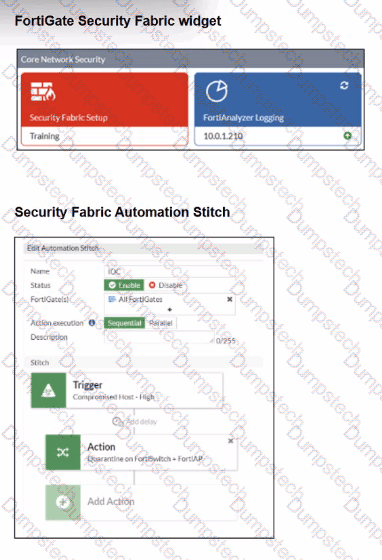

Examine the FortiGate configuration, FortiAnalyzer logs, and FortiGate widget shown in the exhibits.
Security Fabhc quarantine automation has been configured to isolate compromised devices automatically. FortiAnalyzer has been added to the Security Fabric, and an automation stitch has been configured to quarantine compromised devices.
To test the setup, a device with the IP address 10.0.2.1 that is connected through a managed FortiSwitch attempts to access a malicious website. The logs on FortiAnalyzer confirm that the event was recorded, but the device does not appear in the FortiGate quarantine widget.
Which two reasons could explain why FortiGate is not quarantining the device? (Choose two.)
You are troubleshooting a Syslog-based single sign-on (SSO) issue on FortiAuthenticator, where user authentication is not being correctly mapped from the syslog messages. You need a tool to diagnose the issue and understand the logs to resolve it quickly.
Which tool in FortiAuthenticator can you use to troubleshoot and diagnose a Syslog SSO issue?
Refer to the exhibit.
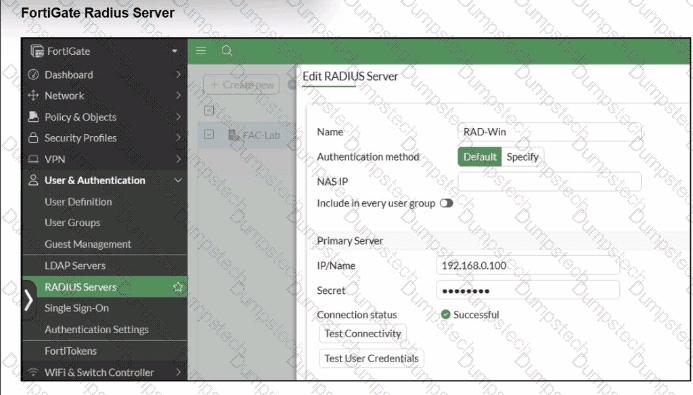

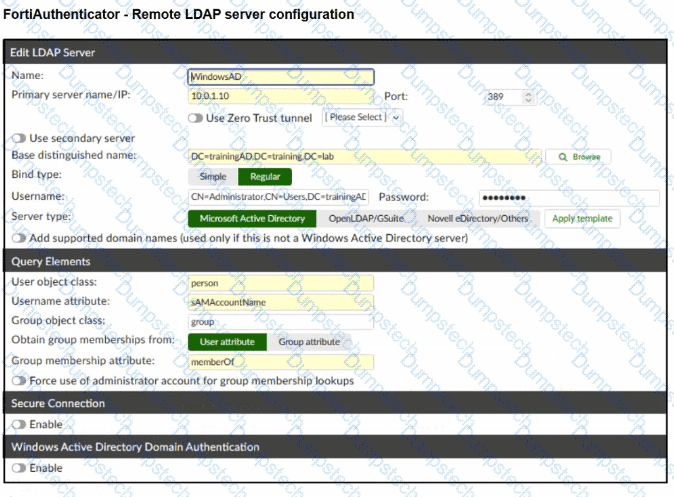
A RADIUS server has been successfully configured on FortiGate, which sends RADIUS authentication requests to FortiAuthenticator. FortiAuthenticator, in turn, relays the authentication using LDAP to a Windows Active Directory server.
It was reported that wireless users are unable to authenticate successfully.
The FortiGate configuration confirms that it can connect to the RADIUS server without issues.
While testing authentication on FortiGate using the command diagnose test authserver radius, it was observed that authentication succeeds with PAP but fails with MSCHAPv2.
Additionally, the Remote LDAP Server configuration on FortiAuthenticator was reviewed.
Which configuration change might resolve this issue?
Refer to the exhibits.
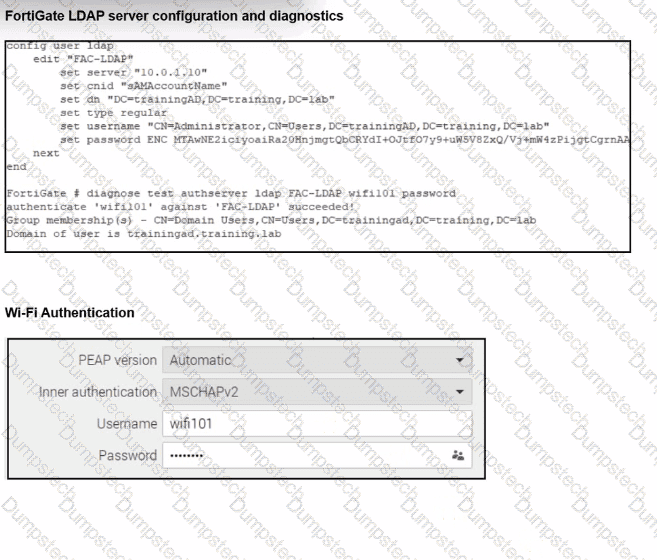
An LDAP server has been successfully configured on FortiGate. which forwards LDAP authentication requests to a Windows Active Directory (AD) server. Wireless users report that they are unable to authenticate. Upon troubleshooting, you find that authentication fails when using MSCHAPv2.
What is the most likely reason for this issue?
In addition to requiring a FortiAnalyzer device to configure the Security Fabric, which license must be added to FortiAnalyzer to use Indicators of Compromise (IOC) rules?
Connectivity tests are being performed on a newly configured VLAN. The VLAN is configured on a FortiSwitch device that is managed by FortiGate. During testing, it is observed that devices
within the VLAN can successfully ping FortiGate. and FortiGate can also ping these devices.
Inter-VLAN communication is working as expected. However, devices within the same VLAN are unable to communicate with each other.
What could be causing this issue?
Refer to the exhibits.


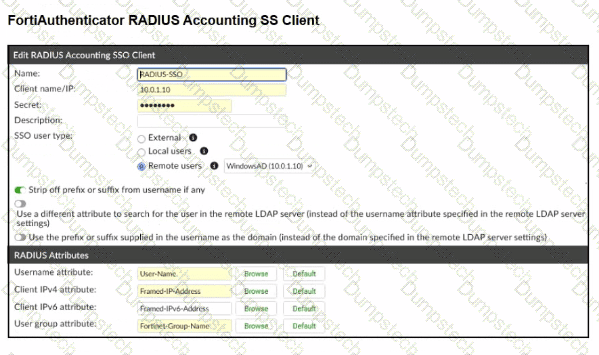
A company has multiple FortiGate devices deployed and wants to centralize user authentication and authorization. The administrator decides to use FortiAuthenticator to convert RSSO messages to FSSO, allowing all FortiGate devices to receive user authentication updates.
After configuring FortiAuthenticator to receive RADIUS accounting messages, users can authenticate, but FortiGate does not enforce the correct policies based on user groups. Upon investigation, the administrator discovers that FortiAuthenticator is receiving RADIUS accounting messages from the RADIUS server and successfully queries LDAP for user group information. But, FSSO updates are not being sent to FortiGate devices and FortiGate firewall policies based on FSSO user groups are not being applied.
What is the most likely reason FortiGate is not receiving FSSO updates?
