
75only - Ends in 0d 00h 00m 00s - Coupon code = 75only
Pass the Fortinet Certified Professional Security Operations NSE7_SOC_AR-7.6 Questions and answers with Dumpstech
Refer to the exhibit.

You are reviewing the Triggering Events page for a FortiSIEM incident. You want to remove the Reporting IP column because you have only one firewall in the topology. How do you accomplish this? (Choose one answer)
Refer to the exhibit.

You must configure the FortiGate connector to allow FortiSOAR to perform actions on a firewall. However, the connection fails. Which two configurations are required? (Choose two answers)
Using the default data ingestion wizard in FortiSOAR, place the incident handling workflow from FortiSIEM to FortiSOAR in the correct sequence. Select each workflow component in the left column, hold and drag it to a blank position in the column on the right. Place the four correct workflow components in order, placing the first step in the first position at the top of the column.


Review the following incident report:
Attackers leveraged a phishing email campaign targeting your employees.
The email likely impersonated a trusted source, such as the IT department, and requested login credentials.
An unsuspecting employee clicked a malicious link in the email, leading to the download and execution of a Remote Access Trojan (RAT).
The RAT provided the attackers with remote access and a foothold in the compromised system.
Which two MITRE ATT&CK tactics does this incident report capture? (Choose two.)
Refer to the exhibit.

You configured a playbook namedFalse Positive Close, and want to run it to verify if it works. However, when you clickExecuteand search for the playbook, you do not see it listed. Which two reasons could be the cause of the problem? (Choose two answers)
A customer wants FortiAnalyzer to run an automation stitch that executes a CLI command on FortiGate to block a predefined list of URLs, if a botnet command-and-control (C&C) server IP is detected.
Which FortiAnalyzer feature must you use to start this automation process?
Which statement describes automation stitch integration between FortiGate and FortiAnalyzer?
You suspect your organization has been a victim of numerous incidents carried out by the same threat actor. Which option allows you to group the incidents and track them? Choose one answer.
Which two ways can you create an incident on FortiAnalyzer? (Choose two.)
Refer to Exhibits:
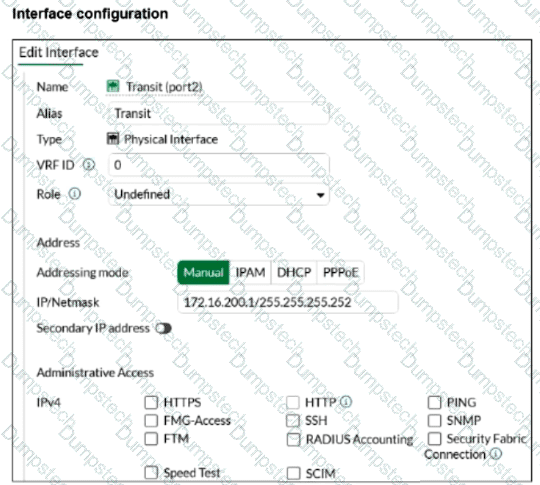
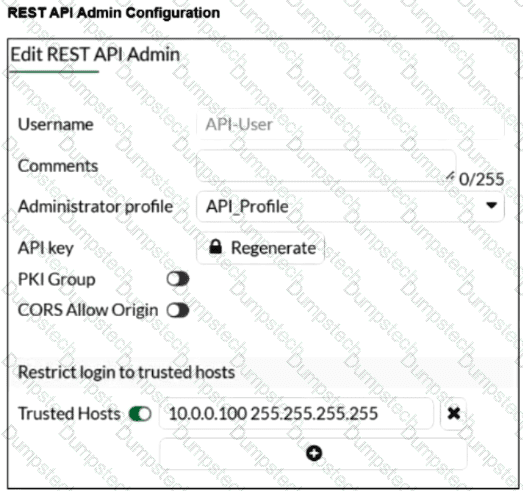
You configured the FortiGate connector on FortiSOAR. You want to allow FortiSOAR 10.200.200.160 to perform actions on FortiGate 172.16.200.1 . However, the connection attempt fails. Assume that the FortiGate connector is configured correctly on the FortiSOAR side.
Which two configurations are required on FortiGate? Choose two answers.
