Pre-Winter Sale Limited Time 75% Discount Offer - Ends in 0d 00h 00m 00s - Coupon code = simple75
Pass the Microsoft Certified: Windows Virtual Desktop Specialty AZ-140 Questions and answers with Dumpstech
You have an Azure Virtual Desktop deployment.
You use Hyper-V to create a virtual machine that runs Windows 11 and has the following configurations:
• Virtual machine generation: Generation 2
• Disk type: Dynamically expanding
• Disk format: VHDX
• Disk size: 2 TB
You need to prepare the virtual machine before uploading it to Azure.
Which two actions should you perform? Each correct answer presents part of the solution.
NOTE: Each correct selection is worth one point.
Note: This question is part of a series of questions that present the same scenario. Each question in the series contains a unique solution that might meet the stated goals. Some question sets might have more than one correct solution, while others might not have a correct solution.
After you answer a question in this section, you will NOT be able to return to it. As a result, these questions will not appear in the review screen.
You have an Azure Virtual Desktop host pool that runs Windows 10 Enterprise multi-session.
User sessions are load-balanced between the session hosts. Idle session timeout is 30 minutes.
You plan to shut down a session host named Host1 to perform routine maintenance.
You need to prevent new user sessions to Host1 without disconnecting active user sessions.
Solution: From the host pool, you remove Host1 from the session host list.
Does this meet the goal?
-
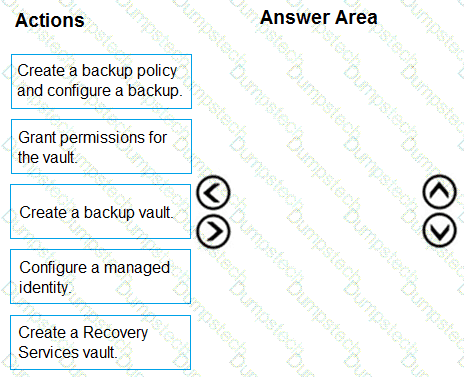
You have an Azure Virtual Desktop personal host pool. Each session host in the pool that has an operating system disk and a data disk.
You need to back up the session host data disks.
Which three actions should you perform in sequence? To answer, move the appropriate actions from the list of actions to the answer area and arrange them in the correct order.

You have an Azure Virtual Desktop deployment that contains a host pool.
The host pool contains 100 session hosts that run Windows 10 on general-purpose virtual machines.
You plan to implement Quality of Service (QoS) for the deployment.
What should you do first?
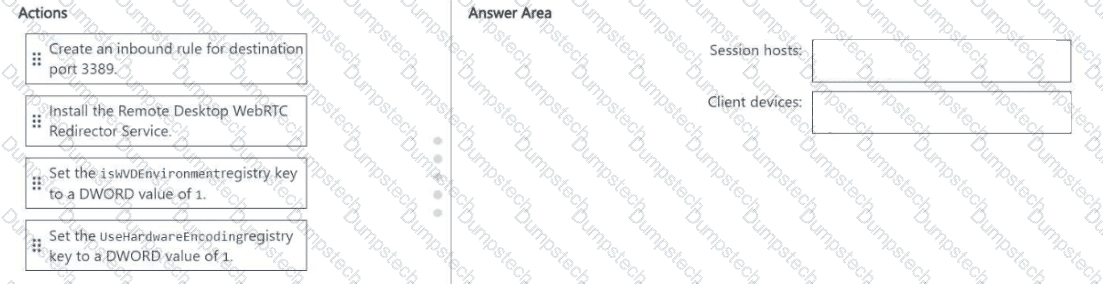
You have an Azure Virtual Desktop deployment that contains a host pool named Pooh.
Pool1 contains session hosts that run Windows 11 Enterprise and have Microsoft Teams installed.
Users connect to the session hosts by using client devices that run Windows 10 Enterprise.
You need to configure the session hosts and the client devices to meet the following requirements:
• Teams audio and video must be processed on the client devices.
• Hardware encoding must be enabled.
What should you do? To answer, drag the appropriate actions to the correct devices. Each action may be used once, more than once, or not at all. You may need to drag the split bar between panes or scroll to view content.
NOTE Each correct selection is worth one point.

You have a Microsoft Entra tenant named contoso.com that contains cloud-only user accounts.
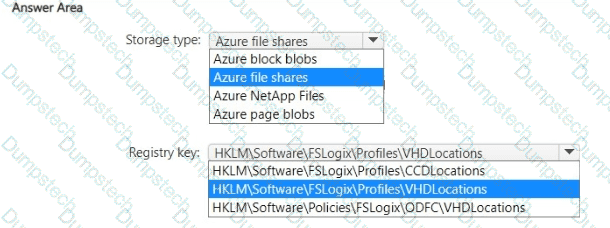
You have an Azure Virtual Desktop deployment that contains a host pool named Pool1. Pool1 contains session hosts that are joined to contoso.com.
You plan to use FSLogix profile containers to manage user profiles.
You need to configure storage for the FSLogix solution.
Which type of storage should you use for the profile containers, and which FSLogix registry key should you configure? To answer, select the appropriate options in the answer area.
NOTE: Each correct selection is worth one point.

You have an Azure Virtual Desktop host pool that uses FSlogix user profiles. The user profiles are stored in an Azure Files share named share1.
You need to back up share1 by using Azure Backup.
What should you create first? To answer, select the appropriate options in the answer area.
NOTE: Each correct selection is worth one point.
You have an Azure Virtual Desktop deployment that contains two Active Directory joined session hosts named Host! and Host2. FSLogix Profile Containers and Office Containers have different locations and are used for both session hosts. You have a Microsoft Entra tenant that contains the synced users shown in the following table.
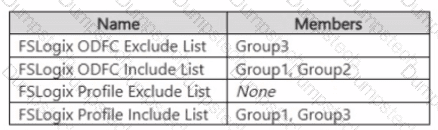
Host2 contains the local groups shown in the following table.
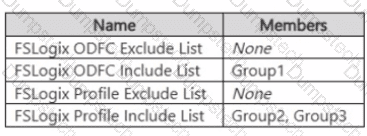
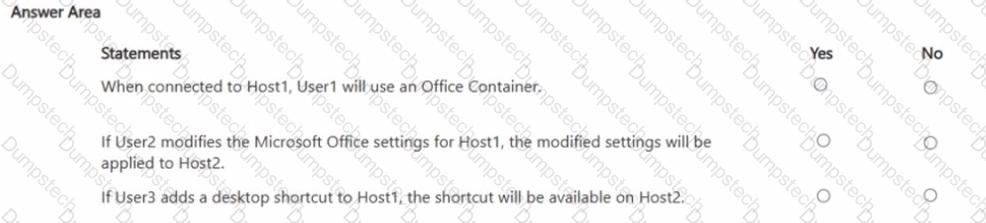
For each of the following statements, select Yes if the statement is true. Otherwise, select No.
NOTE: Each correct selection is worth one point.

You are automating the deployment of an Azure Virtual Desktop host pool.
You deploy the Azure Resource Manager (ARM) template shown in the following exhibit.
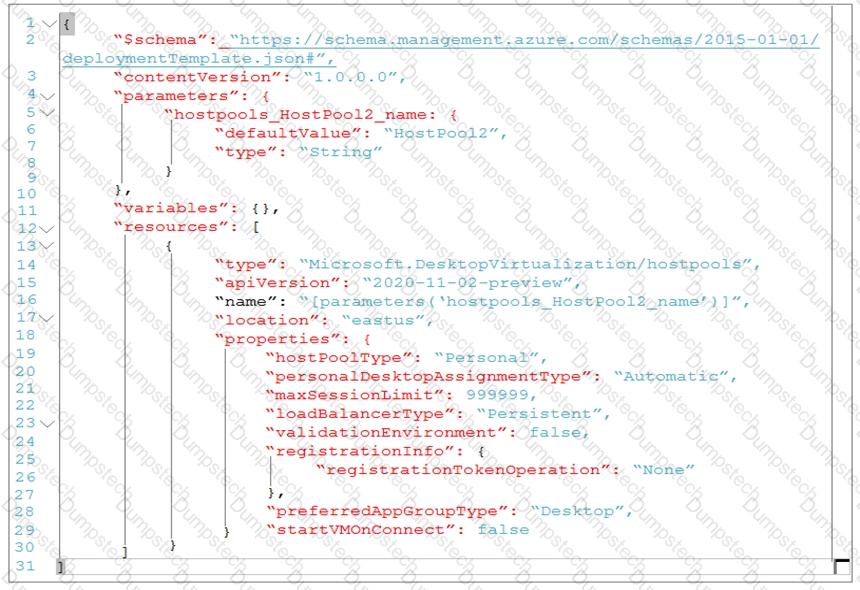
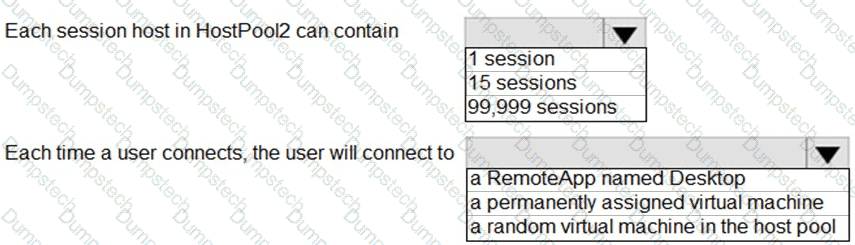
Use the drop-down menus to select the answer choice that completes each statement based on the information presented in the Dockerfile.
NOTE: Each correct selection is worth one point.

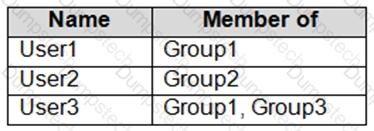
You have a hybrid Azure Active Directory (Azure AD) tenant named contoso.com that contains the users shown in the following table.
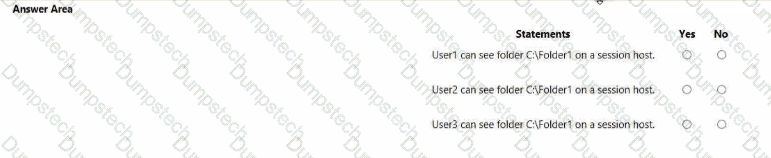
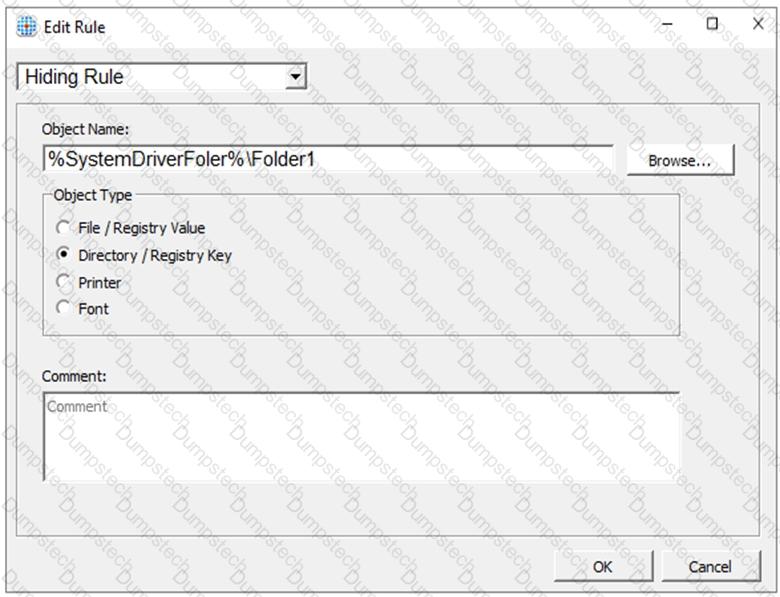
You have an Azure Virtual Desktop host pool. All the session hosts have a folder named C:\Folder1.
You create an FSLogix Application Masking rule as shown in the following exhibit.
You create assignments for the Application Masking rule as shown in the following exhibit.
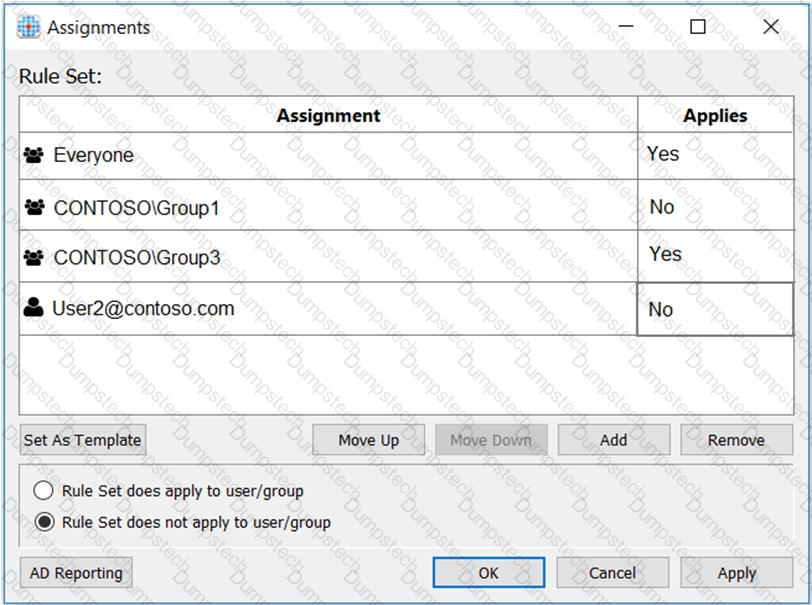
For each of the following statements, select Yes if the statement is true. Otherwise, select No.
NOTE: Each correct selection is worth one point.