Winter Sale Limited Time 65% Discount Offer - Ends in 0d 00h 00m 00s - Coupon code = pass65

Pass the Oracle CPQ Cloud 1z0-1033-25 Questions and answers with Dumpstech

Exam 1z0-1033-25 Premium Access

View all detail and faqs for the 1z0-1033-25 exam

Practice at least 50% of the questions to maximize your chances of passing.
Viewing page 1 out of 4 pages
Viewing questions 1-10 out of questions
Questions # 1:

An administrator tries to change the document views on an attribute from a participant profile on a given step. But the attribute is not listed in the list of attributes that are available for editing.

What are two reasons for this behavior? (Choose two.)

Options:

A.

The attribute is being referenced in an active Hiding rule.

B.

The attribute is not added to the layout.

C.

The attribute is hidden on the Attribute Details page.

D.

The attribute is a system attribute.

Questions # 2:

What standard functionality would you use to align attribute labels on a configuration screen so that they are evenly distributed vertically?

Options:

A.

Add spacers in the Configuration Layout and define spacer height.

B.

Add read-only text area attributes in the layout with the required dimensions.

C.

Use CSS.

D.

Add HTML attributes and use
.

Questions # 3:

You want to add multiple sections to your Document Designer template, and you want the sections flow in the template without page breaks between each section.

How would you accomplish this?

Options:

A.

Select the Child Section check box in the Section Properties panel for each subsequent section following the first section in the series.

B.

Add each section to the template and manually remove the page breaks at the end of each section.

C.

Add the first section in the series and select the Continuous Section check box in the Section Properties panel.

D.

You do not have to do anything because this is the default behavior in Document Designer.

E.

Select the Continuous Section check box in the Section Properties panel for each subsequent section following the first section in the series.

Questions # 4:

You want to enable the display of ABO Delta Pricing in the Line Item Grid of the transaction layout. This requires the creation of new Commerce attributes to support this functionality.

What type of attributes should you create to enable Delta Pricing in the Line Item Grid of the transaction layout?

Options:

A.

Delta Pricing Array Set

B.

ABO Delta Pricing Set

C.

Delta Pricing Set

D.

Delta Currency Set

Questions # 5:

After saving content to the Content library, you check the Content library Tree and find that the new content is missing. What would be your immediate action?


Options:

A.

Close, refresh dynamic sources, and re-open the Dynamic Data window.

B.

Close and re-open the Content Library Tree.

C.

Deploy Commerce.

D.

Deploy Config and Commerce.


Questions # 6:

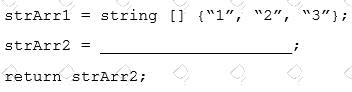
Given the following code:

Question # 6

Which one of the following statements, when placed in the blank space, will give strArr2 a value of “123?”

Options:

A.

join (strArr1,””)

B.

join (strArr1, ” ”)

C.

combine (” ”, strArr1)

D.

combine (strArr1, ””)

Questions # 7:

Which statement is a proper definition of a Punch-In?

Options:

A.

Punch-Ins are links that hook into a specific Commerce process in the system. They can be used to navigate directly to a given Commerce process in your application. They can also be used to jump into a specific Commerce process from an external website.

B.

Punch-Ins are links that hook into specific product families in the system. They can be used to navigate directly from a product family to another in your application. They can also be used to jump into a specific product family from an external website.

C.

Punch-Ins are links that relate into specific parts in the system. They can be used to search directly for a given part in your application. They can also be used to search for a specific part from an external website.

D.

Punch-Ins are links that hook into specific pages in the system. They can be used to navigate directly from one page to another in your application. They can also be used to jump to a specific page from an external website.

E.

Punch-Ins are buttons that take you to specific pages in the system. They can be used to navigate directly from one page to another in your application.

Questions # 8:

Using standard functionality, how do you prevent a user from manually adding or removing rows in an array set?

Options:

A.

by using CSS to hide icons

B.

by hiding the control attribute

C.

by hiding the control attribute and marking it as a forced set

D.

by selecting the “Disable user override” property on the configurable array set editor page

Questions # 9:

What is the order of execution when a new transaction is created?

Options:

A.

main doc integration, advanced main doc default BML, attribute defaults

B.

process integration, attribute defaults, advanced main doc default BML

C.

process integration, advanced main doc default BML, attribute defaults

D.

process integration, attribute defaults, advanced main doc default BML, main doc integration

E.

attribute defaults, advanced main doc default BML, process integration

F.

advanced main doc default BML, attribute defaults, main doc integration

Questions # 10:

Identify two reasons why some or all transaction in a particular step are hidden for a user in Transaction Manager.

Options:

A.

The step has an auto-forwarding rule, which did not return the user or one of his groups and all participant profiles do not have other permission methods selected.

B.

All participant profiles of this step have group access defined and the “Performer Step” set, and the user did not perform an action on the hidden transactions in other steps.

C.

There is no valid participant profile for this user with hidden transactions.

D.

The user has the RestrictedAccess user type.

E.

A hiding rule was defined in commerce rules.

F.

The participant profile that is valid for this user has the Document Views tab, the Document Views panel, and the “Entire Document” = “hide” setting.

Viewing page 1 out of 4 pages
Viewing questions 1-10 out of questions