
Pre-Winter Sale Limited Time 75% Discount Offer - Ends in 0d 00h 00m 00s - Coupon code = simple75
Pass the Microsoft 365 Certified: Enterprise Administrator Expert MS-102 Questions and answers with Dumpstech
You need to configure automatic enrollment in Intune. The solution must meet the technical requirements.
What should you configure, and to which group should you assign the configurations? To answer, select the appropriate options in the answer area.
NOTE: Each correct selection is worth one point.


You need to create the Safe Attachments policy to meet the technical requirements.
Which option should you select?
You need to create the DLP policy to meet the technical requirements.
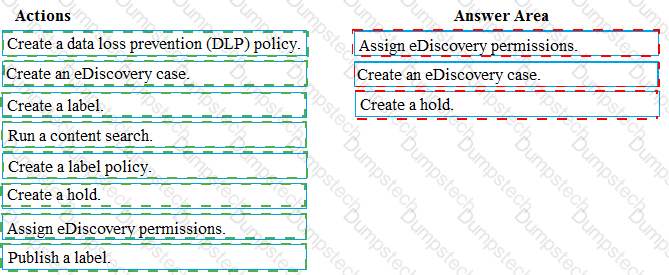
What should you configure first?
You need to ensure that User2 can review the audit logs. The solutions must meet the technical requirements.
To which role group should you add User2, and what should you use? To answer, select the appropriate options in the answer area.
NOTE: Each correct selection is worth one point.


You need to configure Office on the web to meet the technical requirements.
What should you do?
You plan to implement the endpoint protection device configuration profiles to support the planned changes.
You need to identify which devices will be supported, and how many profiles you should implement.
What should you identify? To answer, select the appropriate options in the answer area.
NOTE: Each correct selection is worth one point.

You create the planned DLP policies.
You need to configure notifications to meet the technical requirements.
What should you do?
You have an Azure Active Directory (Azure AD) tenant that contains a user named User1.
Your company purchases a Microsoft 365 subscription.
You need to ensure that User1 is assigned the required role to create file policies and manage alerts in the Cloud App Security admin center.
Solution: From the Azure Active Directory admin center, you assign the Compliance administrator role to User1.
Does this meet the goal?
Your company uses Microsoft Defender for Endpoint.
The devices onboarded to Microsoft Defender for Endpoint are shown in the following table.

The alerts visible in the Microsoft Defender for Endpoint alerts queue are shown in the following table.

You create a suppression rule that has the following settings:
• Triggering IOC: Any IOC
• Action: Hide alert
• Suppression scope: Alerts on ATP1 device group
For each of the following statements, select Yes if the statement is true. Otherwise, select No. NOTE: Each correct selection is worth one point


You have a Microsoft 365 E5 subscription that contains a user named User1. You create an anti-phishing policy named Policy! that has the following settings:
• Include these users, groups and domains: User1
• Phishing email threshold: 3 - More Aggressive
User1 receives the email messages shown in the following table.

Which messages are phishing email?
You have a Microsoft 365 E5 tenant.
industry regulations require that the tenant comply with the ISO 27001 standard.
You need to evaluate the tenant based on the standard
You have a Microsoft 365 subscription.
You need to receive a notification each time a user in the service desk department grants Full Access permissions for a user mailbox.
What should you configure?
You enable the Azure AD Identity Protection weekly digest email.
You create the users shown in the following table.

Which users will receive the weekly digest email automatically?
You have a Microsoft Entra tenant that contains the groups shown in the following exhibit.

Use the drop-down menus to select the answer choice that completes each statement based on the information presented in the graphic.
NOTE: Each cont ' d selection is worth one point.


Note: This question is part of a series of questions that present the same scenario. Each question in the series contains a unique solution that might meet the stated goats. Some question sets might have more than one correct solution, while others might not have a correct solution.
After you answer a question in this section, you will NOT be able to return to it. As a result, these questions will not appear in the review screen.
You have a Microsoft 365 E5 subscription.
You create an account for a new security administrator named SecAdmin1.
You need to ensure that SecAdmin1 can manage Microsoft Defender for Office 365 settings and policies for Microsoft Teams, SharePoint. and OneDrive.
Solution: From the Microsoft 365 admin center, you assign SecAdmin1 the SharePoint Administrator role.
Does this meet the goal?
