Summer Sale Limited Time 75% Discount Offer - Ends in 0d 00h 00m 00s - Coupon code = simple75

Pass the UiPath Certified Professional - Developer Track UiPath-ADPv1 Questions and answers with Dumpstech

Exam UiPath-ADPv1 Premium Access

View all detail and faqs for the UiPath-ADPv1 exam

Practice at least 50% of the questions to maximize your chances of passing.
Viewing page 4 out of 7 pages
Viewing questions 31-40 out of questions
Questions # 31:

A developer is using the REFramework template to automate a process. In " SetTransactionStatus " file, there is the following sequence of activities, where the last Log

Message activity was added by the developer:
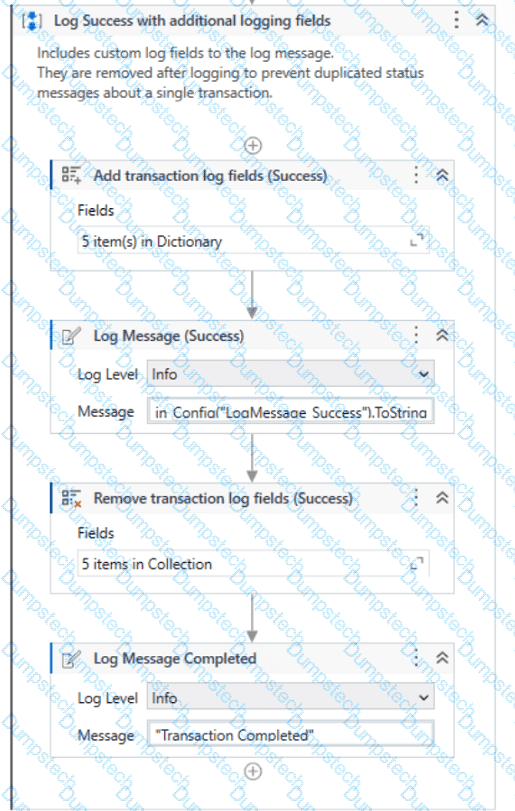
Question # 31

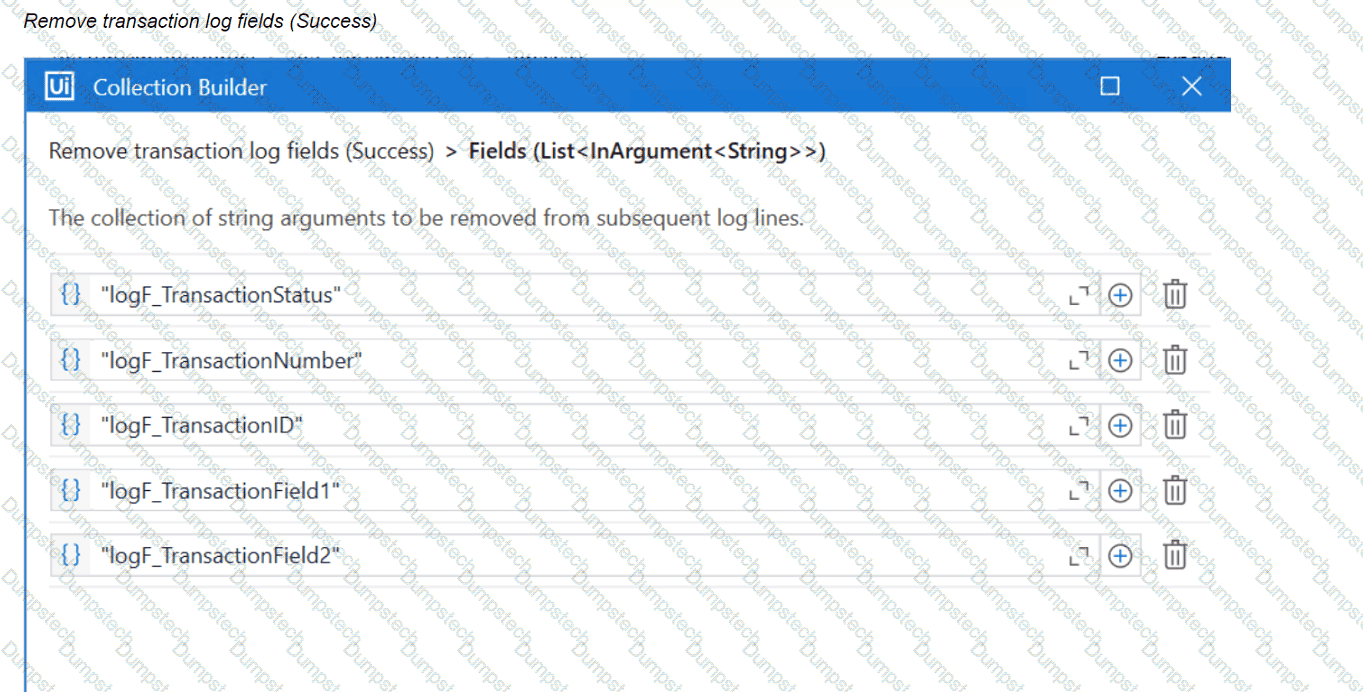
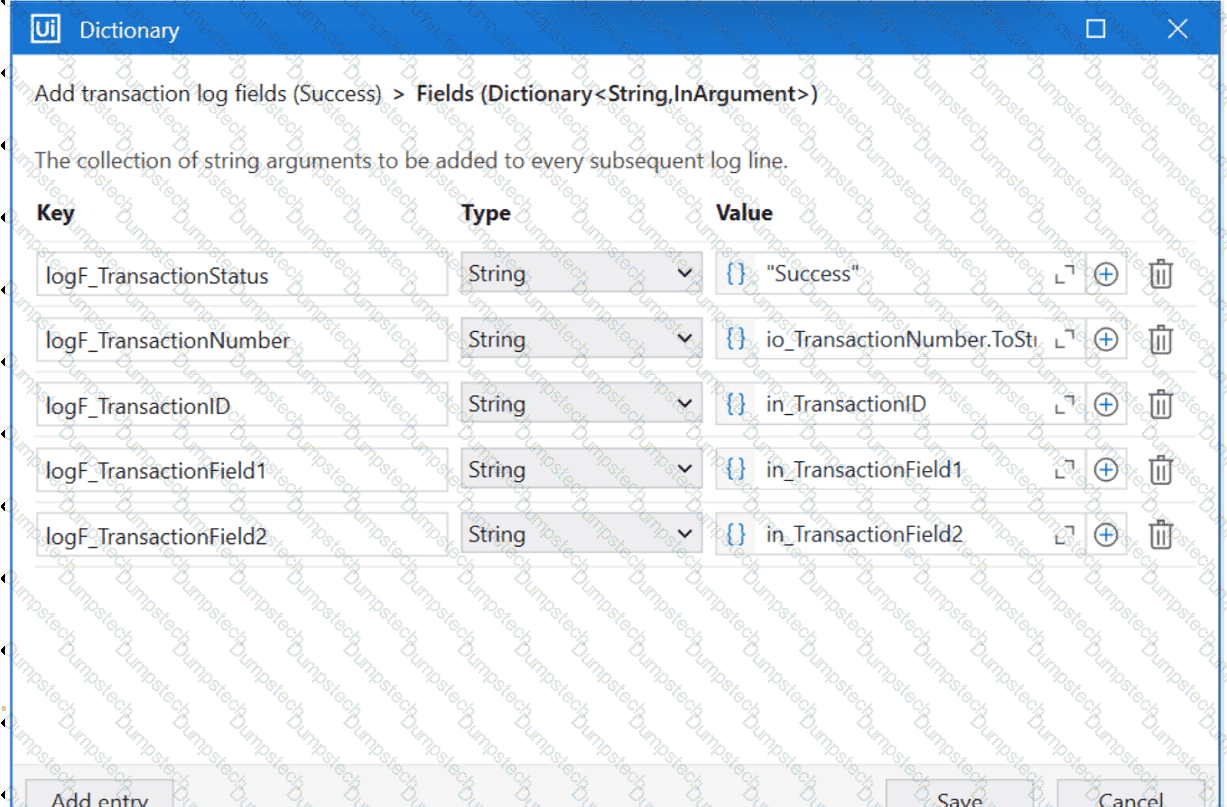
The configuration for Add Log Fields and Remove Log Fields activities are shown below:

Add transaction log fields (Success)
Question # 31

Question # 31

The developer runs the process and notices the argument values for the first transaction are:

in_TransactionID = " 07/18/2023 10:27:29 "

io_TransactionNumber = 1

in_TransactionField1 = " UI235-80 "

in_TransactionField2 = " Update Request "

Which of the following Log Message Details will be displayed when executing the activity Log Message Completed for the first transaction, considering it is successful?

Options:

A.

{ " message " : " Transaction Completed " , " level " : " Information " , " logType " : " User " , " timeStamp " : " 10:30:19 " , " fileName " : " SetTransactionStatus " , " processVersion " : " 1.0.0 " , " jobId " : " cb865477-35f8-4c0a-93e9-e4f4246223f2 " , " robotName " : " test.robot " , " machineId " : 0, " logF_TransactionField2 " : " Update Request " , " logF_TransactionID " : " 07/18/2023 10:27:29 " , " logF_BusinessProces

B.

{ " message " : " Transaction Completed " , " level " : " Information " , " logType " : " User " , " timeStamp " : " 10:30:19 " , " fileName " : " SetTransactionStatus " , " processVersion " : " 1.0.0 " , " jobId " : " 59325301-680a-4d55-a81b-56ca1f369c12 " , " robotName " : " test.robot " , " machineId " : 0, " logF_TransactionField2 " : " " , " logF_TransactionStatus " : " " , " logF_TransactionID " : " logF_BusinessProcessName

C.

{ " message " : " Transaction Completed " , " level " : " Information " , " logType " : " User " , " timeStamp " : " 10:30:19 " , " fileName " : " SetTransactionStatus " , " processVersion " : " 1.0.0 " , " jobId " : " 59325301-680a-4d55-a81b-56ca1f369c12 " , " robotName " : " test.robot " , " machineId " : 0, " logF_TransactionField2 " : empty, " logF_TransactionStatus " : empty, " logF_TransactionID " : empty, " logF_BusinessProce

D.

{ " message " : " Transaction Completed " , " level " : " Information " , " logType " : " User " , " timeStamp " : " 10:30:19 " , " fileName " : " SetTransactionStatus " , " processVersion " : " 1.0.0 " , " jobId " : " f8a36a46-8ebc-40df-8f71-26b39087ebee " , " robotName " : " test.robot " , " machineId " : 0, " logF_BusinessProcessName " : " Framework " }

Questions # 32:

You are tasked with automating a process that requires secure, persisted, and accessible data storage across multiple systems. What is the most suitable benefit of UiPath Data Service for this scenario?

Options:

A.

It stores data on local machines with integrated security for each user’s session.

B.

It integrates directly with third-party cloud storage services to manage data externally.

C.

It provides secured, persisted storage in a central location accessible to all UiPath products.

D.

It enables real-time data processing only in attended workflows with no data persistence.

Questions # 33:

What are the five severity levels of Orchestrator alerts?

Options:

A.

Info, Success, Warn, Error, Fatal.

B.

Info. Success. Warning. Error. Critical.

C.

Information, Complete. Warning, Error, Failure.

D.

Info, Completed. Warning, Error. Fatal.

Questions # 34:

You are building an automation for a CRM system where customer data from various sources needs to be reviewed and consolidated into a single record before being entered into the system.

What is the best strategy for handling the data?

Options:

A.

Use attended workflows to review each piece of customer data separately before manually entering it into the CRM system.

B.

Store the customer data in multiple files, then manually transfer the information between workflows.

C.

Create individual variables for each customer data field and manually merge them in the final step before entering the CRM system.

D.

Consolidate all customer data into a single entity that can be reviewed and processed before final entry into the CRM system.

Questions # 35:

What is the output type returned when using a Get Test Data Queue Item activity?

Options:

A.

Queueltem

B.

Object

C.

Dictionary

Questions # 36:

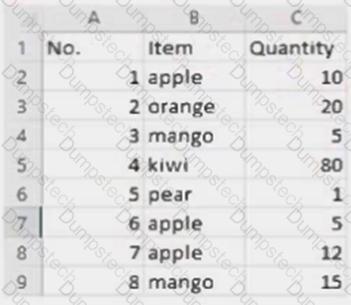
Considering that the attached table is stored in a variable called " dt " :
Question # 36

Which LINQ query can be used to return the maximum total Quantity?

Options:

A.

dt.AsEnumerable. Max(Function(x) Convert.ToInt32(x( " Quantity " ).ToString))

B.

dt.AsEnumerable. Max(Function(x) Convert.ToInt32(x( " Quantity " ).ToString))( " Item " )

C.

dt.AsEnumerable. GroupBy(Function(x) x( " Item " ).ToString). Max(Function(x) x.Sum(Function(y) Convert.ToInt32(y( " Quantity " ).ToString)))

D.

dt.AsEnumerable. OrderByDescending(Function(x) Convert.ToInt32(x( " Quantity " ).ToString)). First.Item( " Quantity " )

Questions # 37:

What status needs to be selected in the Set Transaction Status activity in UiPath Studio so that the respective Queue Item will be retried?

Options:

A.

Retried

B.

Failed

C.

Abandoned

D.

Postponed

Questions # 38:

The following table is stored in a variable called " dt " .
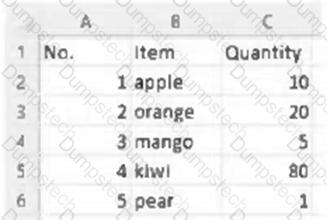
Question # 38

What will the value of the qty variable be after executing the Assign activity?
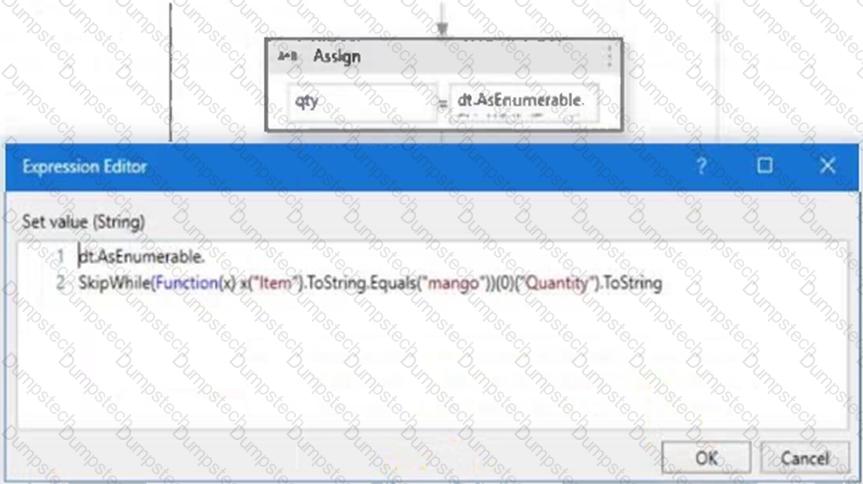
Question # 38

Options:

A.

5

B.

10

C.

80

D.

null

Questions # 39:

In UiPath Studio, how can a specific amount of time be subtracted from the current date using DateTime and TimeSpan variables in the VB.NET?

Options:

A.

Multiply the TimeSpan variable by -1 and then add it to the DateTime variable.

B.

Assign the subtraction result to a DateTime variable with the following syntax Today.Subtract(Span).

C.

Use the Add method on the DateTime variable and pass a negative TimeSpan value.

D.

Call Now.Subtract(Span) directly, without using a DateTime variable.

Questions # 40:

Considering a process developed using REFramework, if the status of a transaction was set to " Failed " with the ErrorType specified as " Business " , the process will transition to which state?

Options:

A.

End Process

B.

Initialization

C.

Get Transaction Data

D.

Process Transaction

Viewing page 4 out of 7 pages
Viewing questions 31-40 out of questions