75only - Ends in 0d 00h 00m 00s - Coupon code = 75only

Pass the Fortinet Network Security Expert NSE5_FSW_AD-7.6 Questions and answers with Dumpstech

Exam NSE5_FSW_AD-7.6 Premium Access

View all detail and faqs for the NSE5_FSW_AD-7.6 exam

Practice at least 50% of the questions to maximize your chances of passing.
Viewing page 1 out of 4 pages
Viewing questions 1-10 out of questions
Questions # 1:

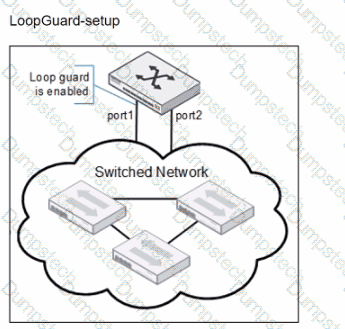
Refer to the exhibits.

Question # 1

Port1 and port2 are the only ports configured with the same native VLAN 10.

What are two reasons that can trigger port1 to shut down? (Choose two.)

Options:

A.

port1 was shut down by loop guard protection.

B.

STP triggered a loop and applied loop guard protection on port1.

C.

An endpoint sent a BPDU on port1 that it received from another interface.

D.

Loop guard frame sourced from port 1 was received on port 1.

Questions # 2:

Which two statements about the FortiLink authorization process are true? (Choose two.)

Options:

A.

The administrator must manually pre-authorize FortiGate on FortiSwitch by adding the FortiGate serial number.

B.

FortiSwitch requires a reboot to complete the authorization process.

C.

A FortiLink frame is sent by FortiGate to FortiSwitch to complete the authorization.

D.

FortiLink authorization sets the FortiSwitch management mode to FortiLink.

Questions # 3:

Which is a requirement to enable SNMP v2c on a managed FortiSwitch?

Options:

A.

Create an SNMP user to use for authentication and encryption.

B.

Specify an SNMP host to send traps to.

C.

Enable an SNMP v3 to handle traps messages with SNMP hosts.

D.

Configure SNMP agent and communities.

Questions # 4:

(Full question statement start from here)

What is an advantage of using a FortiSwitch stack in managed switch mode with FortiGate when deploying VLANs? (Choose one answer)

Options:

A.

FortiGate executing the routing and FortiSwitch managing its configuration.

B.

Ensuring VLAN traffic can pass between connected switches in the stack.

C.

FortiGate no longer needing to manage any VLAN configuration.

D.

FortiGate provides visibility and control for inter-vlan traffic.

Questions # 5:

Exhibit.

You need to manage three FortiSwitch devices using a FortiGate device. Two of the FortiSwitch devices initiated a reboot after the authorization process. However, the FortiSwitch device with the configuration shown in the exhibit. did not reboot All three devices completed FortiLink manage-ment authorization successfully.

Why did the FortiSwitch device shown in the exhibit not reboot to complete the authorization pro-cess?

The management mode was set to use FortiLink mode.

Options:

A.

Switch auto-discovery is enabled.

B.

The management mode was set to use FortiLink mode.

C.

The FortiSwitch device is scheduled to reboot as part the authorization process

D.

The system time is not in-sync and is using a non-default value

Questions # 6:

Which statement about the configuration of VLANs on a managed FortiSwitch port is true?

Options:

A.

Untagged VLANs must be part of the allowed VLANs: ingress and egress.

B.

FortiSwitch VLAN interfaces are created only when FortiSwitch is managed by Forti-Gate.

C.

The native VLAN is implicitly part of the allowed VLAN on the port.

D.

Allowed VLANS expand the collision domain to the port.

Questions # 7:

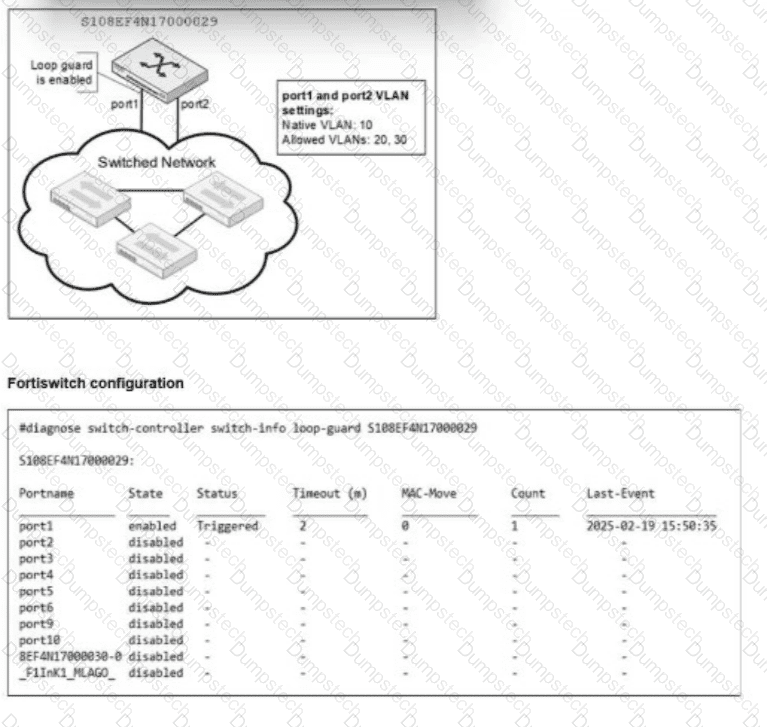
Refer to the exhibits.

Question # 7

You are reviewing a FortiSwitch configuration where port1 and port2 are connected to a switched network. Loop guard is enabled on port1.

The CLI output shows that the port1 status is triggered due to loop guard. Which two conditions could have caused this shutdown? (Choose two.)

Options:

A.

A loop guard frame sent from port1 is received on port2.

B.

A loop guard frame sent from port1 is received back on port1.

C.

Loop guard is triggered because port2 did not send any bridge protocol data units (BPDU).

D.

Loop guard is triggered because the port detected excessive traffic.

Questions # 8:

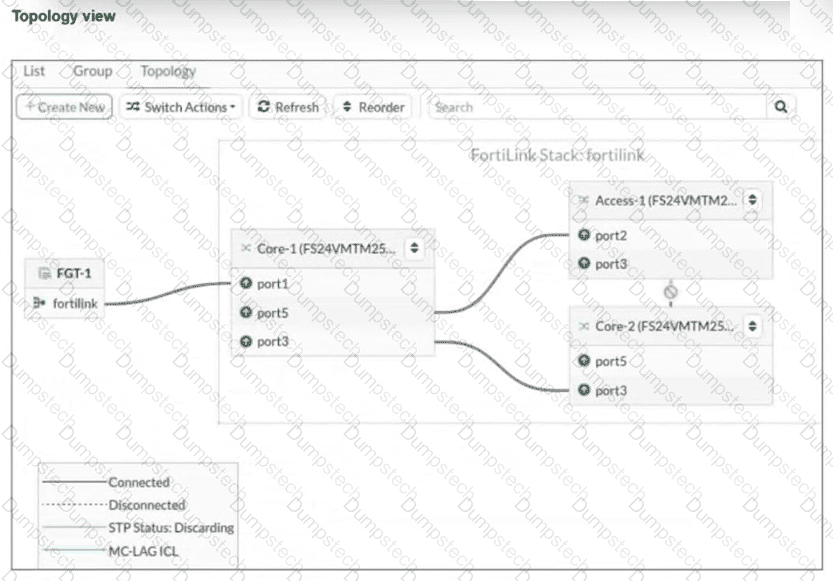
Refer to the exhibit.

Question # 8

You just connected three FortiSwitch devices:Core-1,Core-2, andAccess-1. Core-1 and Core-2 both connect to Access-1 for redundancy. All switches are managed by FortiGate, which uses port4 as the FortiLink interface. After you enable the uplink ports on Core-2, you notice that port3 on Access-1 enters the Discarding STP state. What is the most likely cause of this behavior? (Choose one answer)

Options:

A.

Bridge Protocol Data Unit (BPDU) Guard is enabled, which shuts down the port after it receives BPDUs.

B.

Access-1 is not authorized by FortiGate.

C.

Core-2 has the lowest bridge priority.

D.

FortiGate is not running Spanning Tree Protocol (STP) on the FortiLink interface.

Questions # 9:

FortiGate is unable to establish a tunnel with the FortiSwitch device it is supposed to manage Based on the debug output shown in the exhibit, what is the reason for the failure?

Options:

A.

The handshake process timed out before FortiSwitch responded.

B.

DTLS client hello had the incorrect pre-shared key.

C.

The CAPWAP tunnel failed to come up due to a mismatch in time.

D.

FortiSwitch has disabled FortiLink and is only managed as a standalone.

Questions # 10:

How does FortiSwitch perform actions on ingress and egress traffic using the access control list (ACL)?

Options:

A.

Only high-end FortiSwitch models support ACL.

B.

ACL can be used only at the prelookup stage in the traffic processing pipeline.

C.

Classifiers enable matching traffic based only on the VLAN ID.

D.

FortiSwitch checks ACL policies only from top to bottom.

Viewing page 1 out of 4 pages
Viewing questions 1-10 out of questions