
Black Friday VIP Hour Limited Time 75% Discount Offer - Ends in 0d 00h 00m 00s - Coupon code = simple75
Pass the HP ACA Campus Access Associate HPE6-A85 Questions and answers with Dumpstech
Match the most cost-effective cabling option to each requirement. All lengths include the total cable length, including patch cables and service loops where used.
Drag & Drop
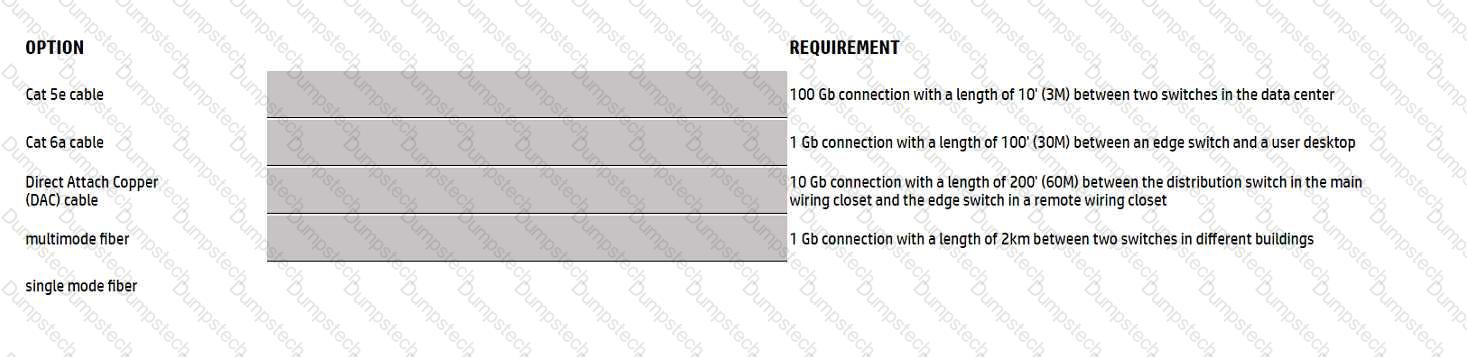
Options:
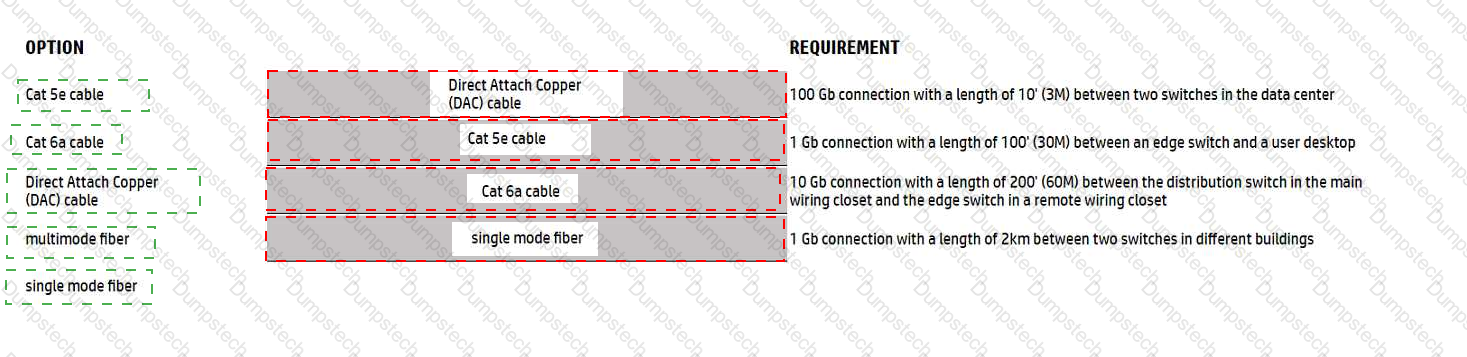
See mapping
Exhibit item
Correct match
100 Gb, 3 m, data center switches
Direct Attach Copper (DAC) cable
1 Gb, 30 m, access switch to desktop
Cat 5e cable
10 Gb, 60 m, distribution to access switch
Cat 6a cable
1 Gb, 2 km, between buildings
Single-mode fiber
Comprehensive and Detailed Explanation
HPE Press guide context | PDF page 43 | HPE Press, Aruba Certified Associate – Campus Access Official Certification Study Guide
Technical Deep Dive — Reconstructed (Original Chat Text Not Recoverable)
The 100-Gb/s three-meter switch interconnect is best served by a supported DAC; 1-Gb/s at 30 meters can use Cat 5e; 10-Gb/s at 60 meters requires suitable Cat 6a; and a two-kilometer 1-Gb/s inter-building connection requires compatible single-mode optical fiber. Optics must match fiber type, speed, wavelength, and distance.
The exhibit is a matching question: each original item must be paired with the applicable protocol, medium, security function, or address classification. The answer table below records the intended correspondence without changing the source exhibit.
In campus network design, a successful decision must satisfy the customer's capacity, topology, physical environment, and lifecycle constraints.
For example, a campus may have sufficient equipment for today but require additional switch ports, PoE budget, or wireless capacity as its user population grows.
A strong verification step is to compare the expected outcome with operational status before and after the change. This confirms not only that a configuration was accepted, but also that the required service actually functions.
After configuring the edge-switch uplink as requested, your colleague reports that they cannot ping the core. You ask them to confirm that the connection is plugged in and that the switch is powered on; they confirm both. You ping the core switch and verify that the ping also fails.
Knowing the nature of this deployment, which commands could you use to troubleshoot the issue?
Options:
Plaintext
Show run- to view the running configuration of the switch
Show run I begin 20 "vlan 20" -to ensure VLAN 20 was correctly added to the database
Show run I begin 20 "interface vlan 20"- to view the L3 SVI configuration
Show run interface 1/1/51,1/1/52- to ensure the physical interfaces are no shut and were added as members of LAG 1
Show run int lag1 -to verify LACP mode active was configur
Plaintext
ping 10.1.1.1 -ping the core to attempt to verify connectivity
Show lacp agg- to verify which link aggregations are currently configured using which physical ports
Show lacp int - to verify the LACP status and whether any links are blocking in your topology
Show lldp neighbors- to verify whether you are ablr to see the Core as an L2 neighbot to verify if the correct links are plugged in to the
Plaintext
Diagnostic diag
cable-diag 1/1/51
diag cable-diag 1/1/52-to view diagnostic information for the physical link to get a status on any interruptions to Layer 1
Connectivity
Show ip route- to verify that the default gateway is present in the routing table
Show ip ospf- to check whether there is a layer 3 routing protocol enabled
Show ip dns - to view whether there is a valid dns
Plaintext
Ping 10.1.1.1- ping the core to attempt to verify connectivity
Show trunk- to verify if the LAG interface was correclty added to the switch
Show spanning tree- to check for spanning-tree blocked states
Show port-access clients interface all-to view any port-access blocking states or failed authentication attempts on all interfaces
Show run interface vlan20 -to double check the layer 3 sv
Comprehensive and Detailed Explanation
HPE Press guide context | PDF page 154 | HPE Press, Aruba Certified Associate – Campus Access Official Certification Study Guide
Technical Deep Dive — Original Chat Wording
When a newly configured LACP uplink cannot establish connectivity to the core, troubleshooting should proceed systematically through physical connectivity, LACP negotiation, VLAN configuration, and Layer 3 addressing.
Option B contains the most appropriate command sequence because it examines each of these areas.
The ping 10.1.1.1 command tests connectivity to the core gateway.
The show lacp aggregates command identifies configured LAGs and their associated member interfaces.
The show lacp interfaces command reveals LACP negotiation state, synchronization, and forwarding conditions.
The show lldp neighbor-info command helps determine whether the expected core switch is physically connected to the appropriate ports.
The interface configuration checks then verify that the physical interfaces are enabled and assigned to the correct LAG.
The administrator must also check whether LAG 1 permits the required VLANs and whether VLAN 20 is configured as the correct native VLAN.
Finally, the SVI configuration must be inspected to verify the management IP address and operational status.
A concise troubleshooting command set is:
ping 10.1.1.1
show lacp aggregates
show lacp interfaces
show lldp neighbor-info
show running-config interface lag 1
show running-config interface vlan 20
Other diagnostic commands may be useful, but Option B provides the most complete and relevant workflow for this particular LACP-based deployment.
Therefore, Option B is correct.
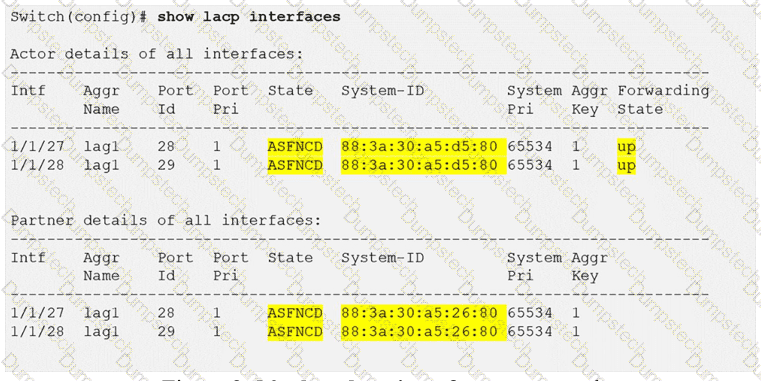
HPE Press study-guide figure / related learning illustration · Fig 2-56 LACP state
Describe what functionality ARP provides.
Options:
ARP uses multicast to build the ARP table.
ARP maps MAC addresses to switch ports.
Clients do not have an ARP cache and always ask for the default gateway
ARP maps layer-3 IP addresses to layer-2 MAC addresses.
Comprehensive and Detailed Explanation
HPE Press guide context | PDF page 50 | HPE Press, Aruba Certified Associate – Campus Access Official Certification Study Guide
Technical Deep Dive — Reconstructed (Original Chat Text Not Recoverable)
Address Resolution Protocol resolves a known local-subnet IPv4 address into a Layer 2 MAC address. An endpoint broadcasts an ARP request and normally receives a unicast ARP reply, then caches the binding. Routers use ARP to resolve the next-hop's MAC address on their outgoing Ethernet network. Switch MAC address tables are learned separately from frame source MACs.
The selected answer corresponds to D: ARP maps layer-3 IP addresses to layer-2 MAC addresses.. This matches the mechanism or management behavior described in the scenario rather than merely a related network feature.
Operational workflows should preserve consistent inventory, authorization, configuration history, and monitoring so that administrators can locate and manage devices predictably.
The operational view should be interpreted together with its underlying records: an alert, subscription count, or device status may describe management state rather than physical availability.
The practical deployment consequence is important: a plausible configuration can still fail when the peer interface, device role, licensing scope, or physical medium is mismatched. Checking that surrounding dependency avoids a misleading diagnosis.
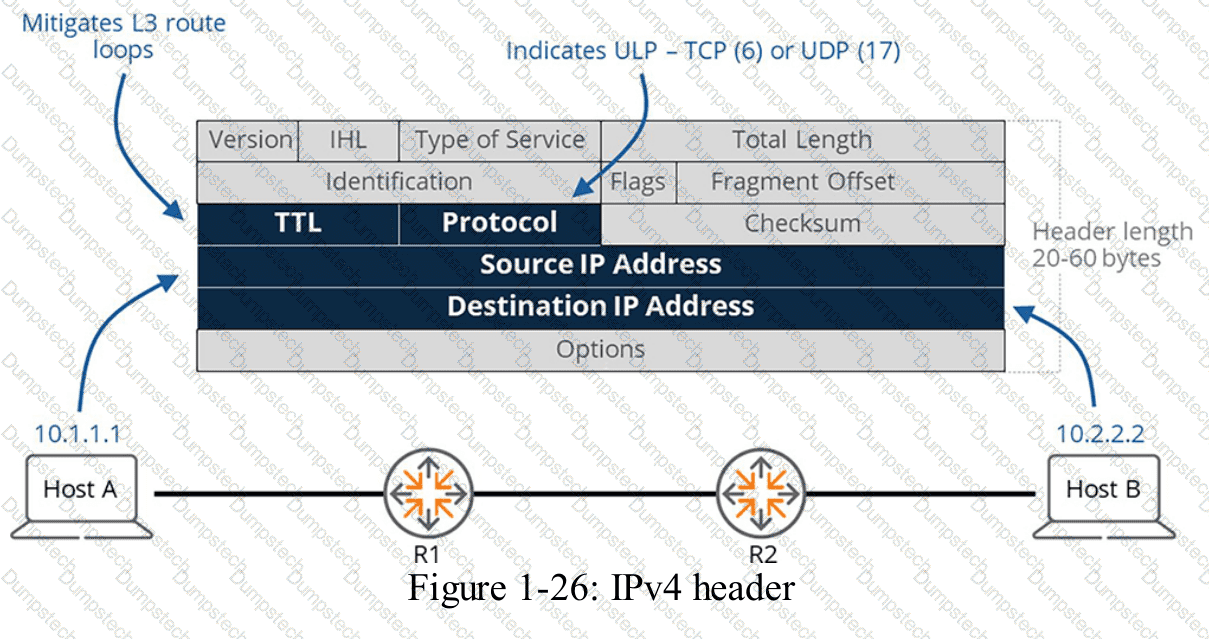
HPE Press study-guide figure / related learning illustration · Fig 1-26 IPv4
What type of authentication does HPE Aruba Networking’s Captive Portal use?
Options:
MAC authentication
Layer 3 authentication
Layer 2 authentication
802.1X authentication
Comprehensive and Detailed Explanation
HPE Press guide context | PDF page 815 | HPE Press, Aruba Certified Associate – Campus Access Official Certification Study Guide
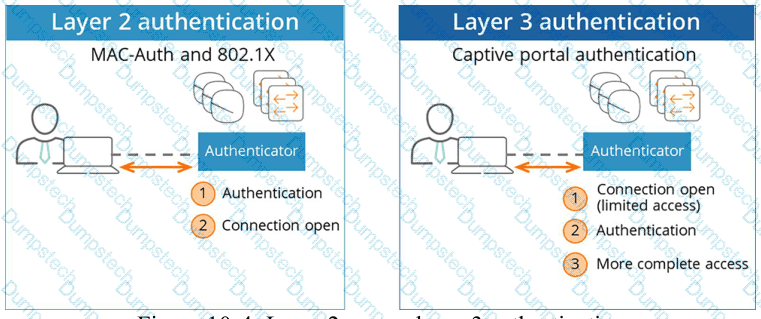
Short exact extract: “Layer 3 authentication takes place after the client receives an active layer 2 connection.”
Technical Deep Dive — Original Chat Wording
Captive portal authentication is commonly used for guest access in enterprise campus environments.
Unlike IEEE 802.1X, which controls network access during the Layer 2 authentication process, a captive portal typically operates after the endpoint has associated with the WLAN and acquired IP connectivity.
A wireless client first completes the ordinary 802.11 association procedure.
The client can then obtain an IP address through DHCP and resolve required network names using DNS.
Before successful captive portal authentication, the assigned access policy generally restricts communication to essential services and approved authentication destinations.
When the user initiates supported web traffic or captive-network detection, the network presents or redirects the user to a portal.
The user may authenticate using guest credentials, a sponsor-generated account, or a supported external identity provider.
Following successful authentication, the infrastructure applies the appropriate authorization policy.
HPE Aruba Networking supports captive portal implementations through Aruba Central and ClearPass Guest.
MAC authentication is based on a client's hardware address. IEEE 802.1X uses EAP-based authentication at the network access layer.
Captive portal authentication differs because it uses IP connectivity and web-based interaction after initial network association.
The portal itself does not replace the need for appropriate wireless encryption and secure transport.
Therefore, Option B (Layer 3 authentication) is correct.
HPE Press study-guide figure / related learning illustration · Fig 10-4 L2 L3 auth
Which role is a valid choice when assigning a role to a user in HPE GreenLake?
Options:
Aruba Central Technician
Workspace Manager
Workspace Administrator
Aruba Central Manager
Comprehensive and Detailed Explanation
HPE Press guide context | PDF page 573 | HPE Press, Aruba Certified Associate – Campus Access Official Certification Study Guide
Technical Deep Dive — Original Chat Wording
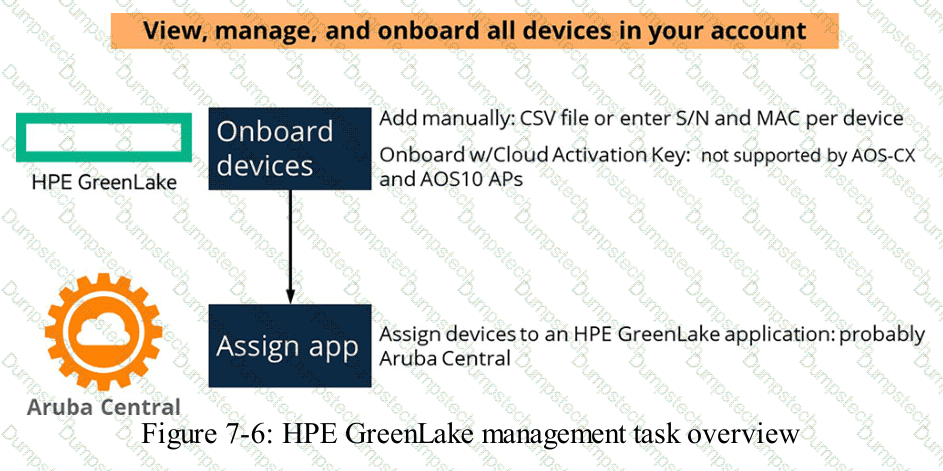
HPE GreenLake uses Role-Based Access Control to determine which administrative activities users can perform within a workspace.
A workspace is an administrative boundary through which users, services, and infrastructure resources can be managed.
The Workspace Administrator role provides elevated permissions for administering workspace resources and user access.
A user with this role can perform supported workspace-management activities, including assigning roles and managing access to services.
For example, an organization may appoint a network operations administrator to manage the GreenLake workspace containing its Aruba Central environment.
The Workspace Administrator can ensure that authorized users receive the appropriate access to the workspace.
However, workspace-level permissions and application-specific permissions must be distinguished.
A user may require both GreenLake workspace permissions and the appropriate Aruba Central application role to perform particular network-management functions.
This supports a layered access-control design in which account administration and network configuration responsibilities are separated.
The role should be assigned only to personnel who need its elevated privileges.
Organizations should apply least-privilege principles and periodically review administrative access.
Aruba Central Technician, Workspace Manager, and Aruba Central Manager are not the matching built-in GreenLake role names for the scenario.
Therefore, Option C (Workspace Administrator) is correct.
HPE Press study-guide figure / related learning illustration · Q135 Fig 7-6 GreenLake
What should you do first to determine a project's goals and scope?
Options:
Define the project's technical requirements.
Set the project's budget limits.
List the organization's available resources.
Identify the organization's key stakeholders.
Comprehensive and Detailed Explanation
HPE Press guide context | PDF page 567 | HPE Press, Aruba Certified Associate – Campus Access Official Certification Study Guide
Technical Deep Dive — Original Chat Wording
A successful network implementation begins with understanding why the project exists and who is responsible for defining its objectives.
The first step is to identify the organization's key stakeholders.
Stakeholders may include business owners, IT managers, network architects, security teams, facilities personnel, and representatives of departments affected by the deployment.
Each group can contribute essential information about project expectations, operational constraints, business priorities, and acceptance criteria.
For example, the security department may require certificate-based authentication, while facilities personnel may identify restrictions on cabling or access-point placement.
Business stakeholders may specify availability targets and future expansion requirements.
After identifying these stakeholders, the network engineer can conduct requirements-discovery meetings and document the project's intended outcomes.
Technical requirements can then be developed from the confirmed business and operational needs.
Budget limits and resource availability are also important constraints, but defining them before establishing the stakeholder group may lead to incomplete assumptions.
The project scope should identify what is included, what is excluded, key dependencies, expected deliverables, and measurable acceptance criteria.
Understanding stakeholders first reduces the likelihood of overlooking critical requirements and helps establish clear decision-making authority.
Therefore, Option D (Identify the organization's key stakeholders) is correct.
Which cable type is most suitable for short copper connections between network devices within the same rack?
Options:
CAT6a Ethernet patch cable.
Power cord.
Single Mode fiber optic cable.
Multimode fiber optic cable.
Comprehensive and Detailed Explanation
HPE Press guide context | PDF page 42 | HPE Press, Aruba Certified Associate – Campus Access Official Certification Study Guide
Technical Deep Dive — Original Chat Wording
Copper Ethernet cabling provides a practical method for connecting network equipment over short distances.
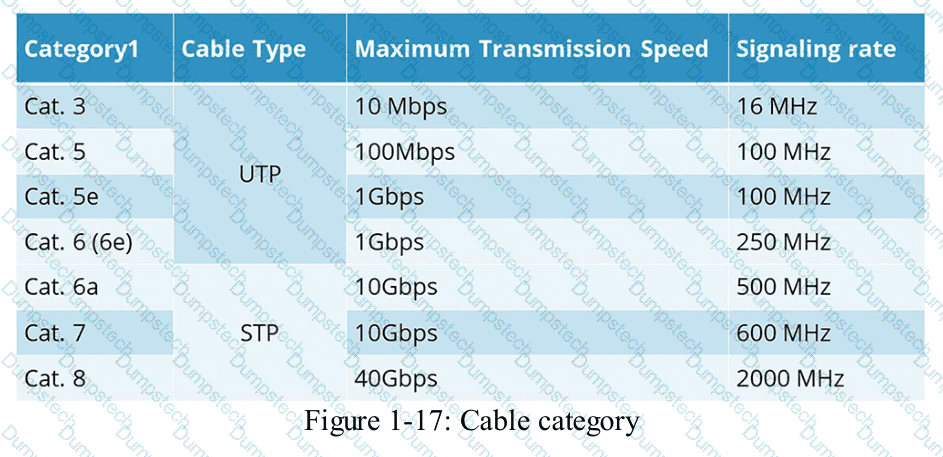
Category 6a (Cat 6a) is designed to support high-speed Ethernet transmission with improved performance against interference and crosstalk.
It supports 10GBASE-T connectivity over standard structured cabling distances up to 100 meters when compatible network interfaces and properly installed cabling are used.
For devices located in the same equipment rack, a short Cat 6a patch cable can provide reliable Ethernet connectivity.
Examples include connections between compatible switches, routers, firewalls, and management devices.
The chosen cable must match the physical Ethernet interfaces of the connected equipment.
For example, a Cat 6a cable is appropriate when both devices use compatible RJ-45 Ethernet ports.
A power cord carries electrical power and is not an Ethernet data cable.
Single-mode and multimode fiber are optical transmission media rather than copper cables.
Fiber connections require compatible optical interfaces and transceivers.
One additional consideration is that Direct Attach Copper (DAC) is often a cost-effective choice for very short, high-speed connections between devices with compatible SFP, SFP+, or QSFP interfaces.
However, DAC is not included among the available options.
Of the four listed choices, only Cat 6a is a suitable copper Ethernet data cable.
Therefore, Option A (CAT6a Ethernet patch cable) is correct.
HPE Press study-guide figure / related learning illustration · Q132 Fig 1-17 Cable Cat
Which action do you take to access profile management in HPE Aruba Networking Central?
Options:
Click the user icon from the Network Overview page.
Click Manage under the Devices menu in the Configuration Overview.
Select device type in the Network Overview page.
Click the configuration (gear) icon from the Network Overview page.
Comprehensive and Detailed Explanation
HPE Press guide context | PDF page 588 | HPE Press, Aruba Certified Associate – Campus Access Official Certification Study Guide
Technical Deep Dive — Original Chat Wording
HPE Aruba Networking Central provides centralized configuration management for switches, access points, gateways, and related networking services.
Configuration profiles allow administrators to define reusable parameters that can be applied to supported devices and operational scopes.
This approach reduces configuration duplication and helps maintain consistent network behavior.
From the Network Overview page in the Central interface described by the question, administrators access configuration management through the configuration icon, represented by a gear.
The configuration workspace provides access to settings associated with network devices and supported configuration scopes.
In the newer Central configuration architecture, administrators can work with profiles under different hierarchy levels, including Global, Sites, Device Groups, and Devices.
The Profiles tab enables administrators to create, inspect, modify, and delete supported configuration profiles.
Profile-based management is useful for standardizing wireless settings, interface behavior, security policies, and other network parameters.
For example, an organization operating several branch offices can define common configuration parameters and apply them consistently across applicable locations.
The user icon is associated with account or user functions rather than network profile management.
Selecting a device type changes the context of the network view but does not directly open profile management.
The configuration gear is the appropriate entry point.
Therefore, Option D (Click the configuration gear icon) is correct.
When you export an audit log from HPE GreenLake, which detail must you provide?
Options:
File type
User role
Date range
Recipient email address
Comprehensive and Detailed Explanation
HPE Press guide context | PDF page 573 | HPE Press, Aruba Certified Associate – Campus Access Official Certification Study Guide
Technical Deep Dive — Original Chat Wording
HPE GreenLake provides audit logging to record relevant account-level and administrative activities.
Exporting these logs allows authorized personnel to examine records outside the management interface.
The export workflow begins by navigating to the Audit Log management page and selecting the export function.
Administrators must choose the required output file type.
Supported choices include CSV and PDF.
CSV is suitable for structured analysis, spreadsheet applications, and automated log processing.
PDF is generally more appropriate when records need to be presented in a fixed-layout document.
After selecting the file type, administrators can choose the records and columns to export.
Depending on the interface, they may export the entire audit log or the current search results.
A date range can be useful for filtering records before exporting, but the documented export procedure does not require a date range to be entered as its mandatory selection.
The user's role determines whether the export operation is authorized; it is not normally a parameter that the user must provide in the export dialog.
A recipient email address is also unnecessary for downloading an audit-log file.
Therefore, Option A (File type) is correct.
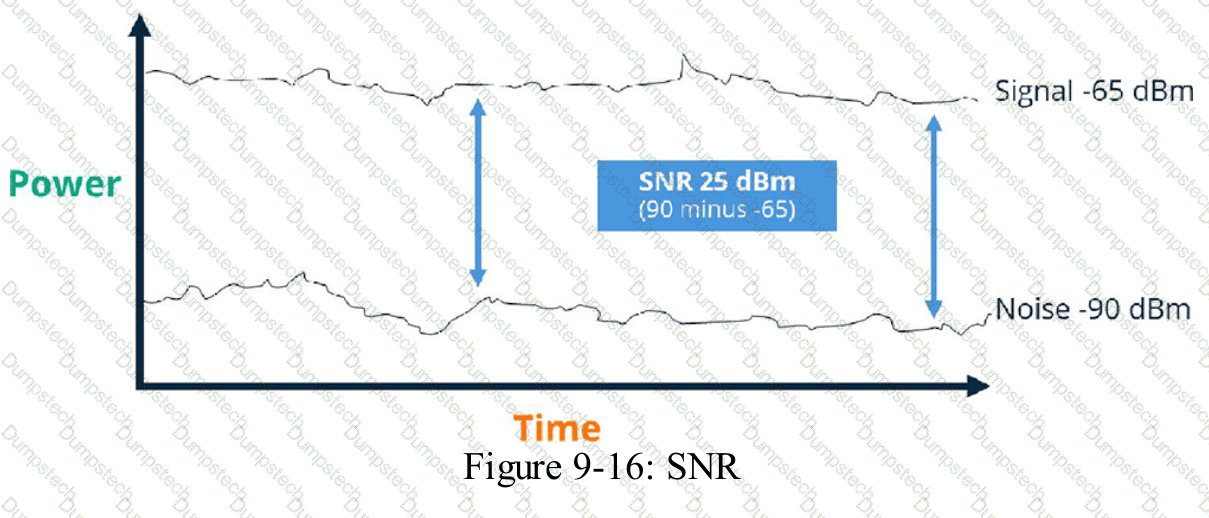
The noise floor is measured at .000000001 milliwatts, and the receiver’s signal strength is -65dBm.
What is the Signal to Noise Ratio?
Options:
45 dBm
25 dBm
15 dBm
35 dBm
Comprehensive and Detailed Explanation
HPE Press guide context | PDF page 717 | HPE Press, Aruba Certified Associate – Campus Access Official Certification Study Guide
Technical Deep Dive — Reconstructed (Original Chat Text Not Recoverable)
Noise power of 0.000000001 mW is -90 dBm. With received signal -65 dBm, SNR is -65 - (-90) = 25 dB, which is dimensionless in decibels, not dBm. The offered answer '25 dBm' uses the wrong unit; numeric 25 is correct.
The selected answer corresponds to B: 25 dBm. This matches the mechanism or management behavior described in the scenario rather than merely a related network feature.
Optimization should consider both immediate performance and its tradeoffs in RF capacity, airtime, reliability, security, and operational overhead.
Use measurements rather than assumptions: compare the RF or switch metrics before and after making a controlled change.
When reviewing alternatives, identify which one directly addresses the stated requirement, rather than selecting a related capability that is useful elsewhere but does not fulfill the requested task.
The wrong choices may describe real technologies, but they perform different functions, apply to another layer, or omit a required prerequisite. Select the answer that resolves the exact scenario, not a nearby administrative task.
HPE Press study-guide figure / related learning illustration · Fig 9-16 SNR
Modal title
