
Black Friday VIP Hour Limited Time 75% Discount Offer - Ends in 0d 00h 00m 00s - Coupon code = simple75
Pass the HP ACA Campus Access Associate HPE6-A85 Questions and answers with Dumpstech
Which capabilities are available to users who are assigned the View Only role in HPE Aruba Networking Central?
Options:
Apply network configuration changes
View dashboards, reports, and analytics
Create and schedule new reports
Edit dashboards, reports, and analytics
Comprehensive and Detailed Explanation
HPE Press guide context | PDF page 588 | HPE Press, Aruba Certified Associate – Campus Access Official Certification Study Guide
Short exact extract: “Aruba Central allows you to manage configurations for different device types.”
Technical Deep Dive — Original Chat Wording
Role-Based Access Control (RBAC) is a security mechanism that associates administrative permissions with defined user roles.
HPE Aruba Networking Central uses RBAC to ensure administrators receive access appropriate to their responsibilities.
The View Only role is intended for personnel who need operational visibility without the ability to change network settings.
For example, monitoring personnel may need to review device availability, network-health dashboards, alerts, and reports while investigating service problems.
Providing read-only permissions allows these users to observe the environment without introducing unnecessary configuration risks.
This supports the principle of least privilege.
A View Only user can inspect permitted dashboards, reports, and analytics but does not receive the same capabilities as an administrator.
Applying network configuration changes requires appropriate write permissions.
Creating new reports and scheduling report generation also generally require report-management permissions beyond read-only access.
Editing dashboards, reports, or analytics configuration similarly requires an authorized management role.
Read-only privileges should not be confused with unrestricted access to every resource. Additional scope restrictions can determine which sites and devices a user is permitted to view.
Therefore, Option B (View dashboards, reports, and analytics) is correct.
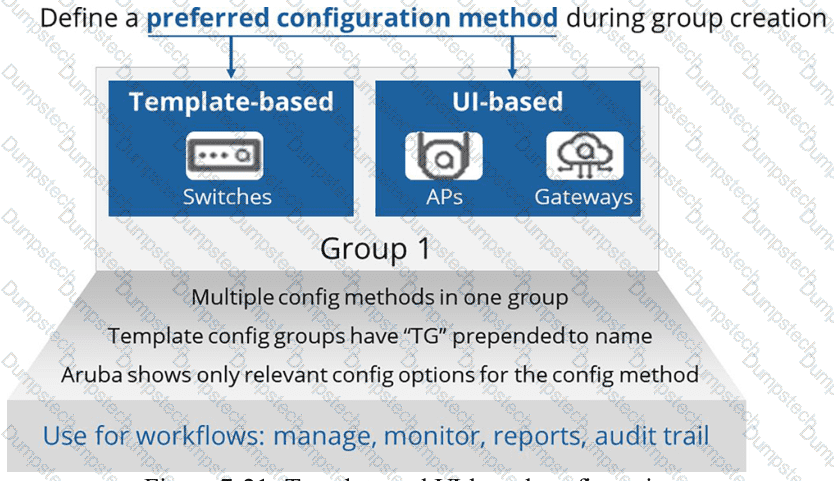
HPE Press study-guide figure / related learning illustration · Q152 Fig 7-21 Groups
What must be done to ensure that HPE Aruba Networking Central can configure devices?
Options:
Assign devices to floor plans.
Assign device functions to devices.
Assign a name to the device.
Create a device inventory record.
Comprehensive and Detailed Explanation
HPE Press guide context | PDF page 567 | HPE Press, Aruba Certified Associate – Campus Access Official Certification Study Guide
Technical Deep Dive — Original Chat Wording
HPE Aruba Networking Central uses device functions to classify infrastructure devices according to their intended network role.
This classification determines which configuration profiles and features can be assigned to the device.
For AOS-CX switches, functions include Access Switch, Aggregation Switch, and Core Switch.
For example, an access switch may require endpoint authentication, port-access policies, and edge-device configurations.
A core switch may instead require routing protocols, high-speed interconnections, and different infrastructure policies.
Central uses the selected device function to ensure that compatible configuration profiles are offered and applied.
In the newer Central onboarding architecture, device functions must be assigned to supported switches before they can be fully configured.
Access points and gateways may receive their functions automatically through the supported onboarding workflow, while switches require explicit assignment.
Device registration remains necessary but is not sufficient by itself.
A device must also satisfy applicable site, group, subscription, and provisioning prerequisites.
Assigning a floor plan improves physical-location visibility but does not determine which configuration profiles a device can use.
Similarly, a device name identifies equipment without establishing its configuration role.
Therefore, Option B (Assign device functions to devices) is correct for the Central configuration architecture described.

HPE Press study-guide figure / related learning illustration · Q137 Fig 7-1 Onboard
How does one CX 6300M switch configuration use Layer 3 connectivity to route traffic between switch virtual interfaces 120 and 130?
Options:
Delete 'no routing' from the SVI interfaces.
Create static routes between SVI 120 and 130.
Route leaking must be configured in default VRF.
Routing is enabled by default with CX 6300M.
Comprehensive and Detailed Explanation
HPE Press guide context | PDF page 221 | HPE Press, Aruba Certified Associate – Campus Access Official Certification Study Guide
Short exact extract: “The SVIs are virtual layer 3 interfaces, for internal routing.”
Technical Deep Dive — Original Chat Wording
The HPE Aruba Networking CX 6300M is a multilayer switch capable of routing traffic between directly connected VLAN interfaces.
A Switched Virtual Interface (SVI) provides a logical Layer 3 interface associated with a particular VLAN.
For example, VLAN 120 may use subnet 10.1.120.0/24 , while VLAN 130 uses subnet 10.1.130.0/24 .
The switch can be configured as follows:
configure terminal
vlan 120
vlan 130
interface vlan 120
ip address 10.1.120.1/24
no shutdown
interface vlan 130
ip address 10.1.130.1/24
no shutdown
When both SVIs are operational in the same VRF, their connected networks are installed in the routing table.
The switch can then forward traffic between those subnets without requiring static routes between them.
Route leaking is unnecessary because both networks reside in the same routing domain.
The no routing command applies to configuring supported physical Ethernet interfaces for Layer 2 switching and is not the required method for enabling SVI routing.
There is an important distinction: AOS-CX software releases can differ in the default routing mode of physical interfaces. This does not change the fundamental behavior of SVIs as routed logical interfaces.
Administrators can verify the connected routes using:
show ip route
show ip interface brief
Therefore, Option D (Routing is enabled by default with CX 6300M) is the correct intended answer for inter-VLAN routing through configured SVIs.
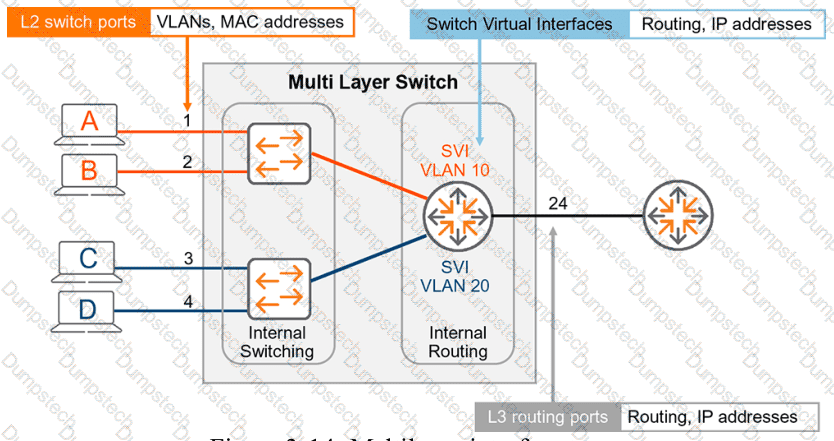
HPE Press study-guide figure / related learning illustration · Q165 Fig 3-14 SVI
When assigning devices in Floor Plan Manager, which filtering option can you use to narrow device information?
Options:
Filter by device group.
Filter by device name.
Filter by device status.
Filter by device type.
Comprehensive and Detailed Explanation
HPE Press guide context | PDF page 689 | HPE Press, Aruba Certified Associate – Campus Access Official Certification Study Guide
Technical Deep Dive — Original Chat Wording
HPE Aruba Networking Central Floor Plan Manager supports the organization and placement of network devices within building floorplans.
This functionality improves visibility into the physical distribution of access points and other supported network infrastructure.
In larger environments, a site may contain many devices across multiple floors or buildings.
Without appropriate filtering, locating the correct equipment during floorplan assignment can become time-consuming.
The device-assignment workflow provides filtering capabilities to narrow the displayed results.
Device type is one supported filtering criterion.
For example, an administrator can filter the available devices to focus on access points instead of examining every device registered in the site.
This makes it easier to identify the equipment that must be positioned on the floorplan.
The interface also supports filtering by device model.
Separately, the search field supports locating devices through attributes such as device names, MAC addresses, serial numbers, and models.
This distinction is important: searching by device name is not the same as selecting a predefined device-type filter .
After narrowing the results, administrators can select the required devices and assign them to the appropriate floor.
Accurate device placement contributes to location-based monitoring and wireless network visualization.
Therefore, Option D (Filter by device type) is correct.
Match each IP address range to its correct designation.
Drag & Drop
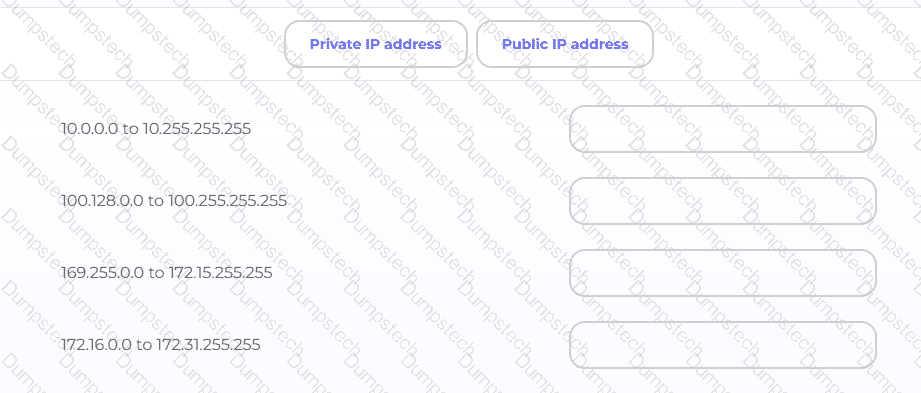
Options:
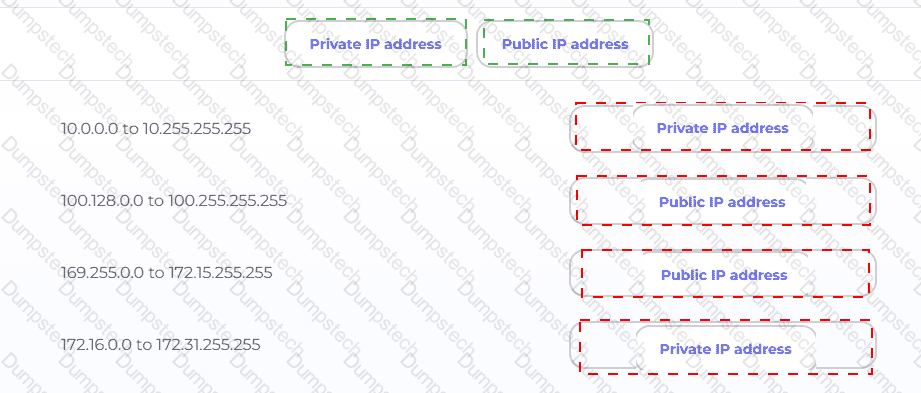
Exhibit item
Correct match
10.0.0.0 to 10.255.255.255
Private
100.128.0.0 to 100.255.255.255
Public (non-RFC1918)
169.255.0.0 to 172.15.255.255
Public (non-RFC1918)
172.16.0.0 to 172.31.255.255
Private
Comprehensive and Detailed Explanation
HPE Press guide context | PDF page 922 | HPE Press, Aruba Certified Associate – Campus Access Official Certification Study Guide
Technical Deep Dive — Original Chat Wording
IPv4 addresses are classified according to their allocation and intended use. RFC 1918 defines three address blocks reserved for private networks.
These addresses can be used internally without being globally unique across organizations. However, they are not intended to be routed directly across the public Internet.
The range 10.0.0.0–10.255.255.255 corresponds to 10.0.0.0/8 , making it private.
The range 172.16.0.0–172.31.255.255 corresponds to 172.16.0.0/12 , also making it private.
The address block 100.128.0.0–100.255.255.255 is outside the RFC 1918 private ranges. It is also outside the special shared-address block 100.64.0.0/10 , used for carrier-grade NAT. It is therefore classified as public address space for this question.
Similarly, 169.255.0.0–172.15.255.255 lies outside the RFC 1918 private blocks. Notably, the IPv4 link-local range is 169.254.0.0/16 , which is not included here.
Private addresses typically require Network Address Translation (NAT) when accessing public Internet resources.
The central principle is that addresses beginning with 172 are not automatically private; only 172.16.0.0/12 is reserved under RFC 1918.
Therefore, the correct sequence is Private, Public, Public, Private .
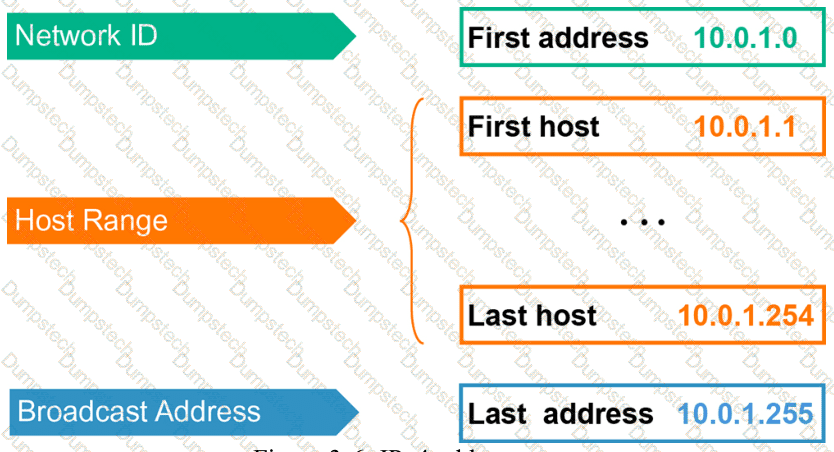
HPE Press study-guide figure / related learning illustration · Q151 Fig 3-6 IP types
Which action is recorded in user audit logs in HPE Aruba Networking Central?
Options:
Policy usage
Configuration changes
Report imports
Mouse Clicks
Comprehensive and Detailed Explanation
HPE Press guide context | PDF page 679 | HPE Press, Aruba Certified Associate – Campus Access Official Certification Study Guide
Technical Deep Dive — Original Chat Wording
Audit logging provides a historical record of administrative and system activities performed within a network-management platform.
In HPE Aruba Networking Central, the Audit Trail helps administrators identify configuration changes and determine when they occurred.
Audit records can include information such as timestamps, the responsible account, affected devices, operation categories, and descriptions of the changes performed.
For example, an administrator may modify an AP group configuration or update an access-control policy.
The Audit Trail can record the associated management activity, allowing authorized personnel to investigate the change later.
This is particularly useful when troubleshooting a problem that begins after a configuration update.
An engineer can compare the time of the reported problem with relevant administrative events.
Audit records also support accountability and security investigations because they establish a record of management operations.
However, audit logging should not be confused with ordinary network traffic monitoring.
Policy usage statistics describe how traffic matches security or forwarding policies.
Mouse-click activity is not comprehensively recorded as a general-purpose user interaction history.
Report imports may generate particular system events, but they are not the fundamental audit function targeted by the question.
The primary purpose of the Audit Trail is to record administrative activity, including configuration modifications.
Therefore, Option B (Configuration changes) is correct.

HPE Press study-guide figure / related learning illustration · Q134 Fig 8-15 Audit
What are two benefits of a UXI?
Choose two
Options:
A UXI can check different applications, such as HTTP, VOIP, or Office 365.
A UXI helps to calculate the best WiFi channels in a remote location.
A UXI behaves like a client/user.
A UXI measures the Wi-Fi coverage of all APs in the given location.
A UXI can be used without any internet connection.
Comprehensive and Detailed Explanation
HPE Press guide context | PDF page 1033 | HPE Press, Aruba Certified Associate – Campus Access Official Certification Study Guide
Technical Deep Dive — Reconstructed (Original Chat Text Not Recoverable)
UXI acts like a real end-user endpoint and runs synthetic connectivity/application tests, including HTTP and supported service transactions. It can monitor application reachability and user-experience symptoms. It is not a replacement for RF planning, complete AP coverage surveys, or internet-independent cloud dashboards.
The selected answer corresponds to A: A UXI can check different applications, such as HTTP, VOIP, or Office 365.; C: A UXI behaves like a client/user.. This matches the mechanism or management behavior described in the scenario rather than merely a related network feature.
Operational workflows should preserve consistent inventory, authorization, configuration history, and monitoring so that administrators can locate and manage devices predictably.
For example, a cloud-managed infrastructure device may be registered successfully but still require the correct subscription, site, group, and configuration scope.
A strong verification step is to compare the expected outcome with operational status before and after the change. This confirms not only that a configuration was accepted, but also that the required service actually functions.
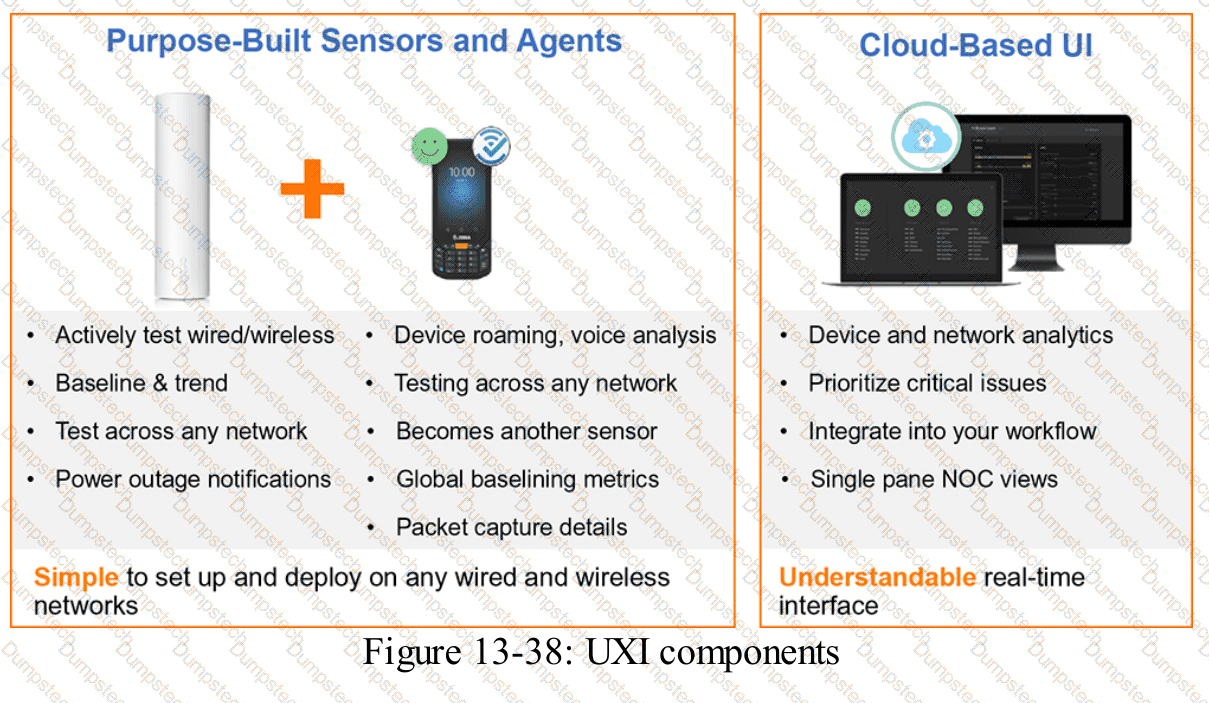
HPE Press study-guide figure / related learning illustration · Fig 13-38 UXI
When using an Aruba standalone AP, you select Native VLAN for Client VLAN Assignment.
In which subnet will the client IP addresses reside?
Options:
The same subnet as the mobility conductor
The same subnet as the HPE Aruba Networking ESP gateway
The same subnet as the mobility controller
The same subnet as the access point
Comprehensive and Detailed Explanation
HPE Press guide context | PDF page 771 | HPE Press, Aruba Certified Associate – Campus Access Official Certification Study Guide
Technical Deep Dive — Reconstructed (Original Chat Text Not Recoverable)
When a standalone Aruba AP assigns the WLAN's native VLAN to wireless clients, clients are bridged into the same Layer 2 subnet as the AP's native network, provided that uplink VLAN handling matches. The mobility controller or conductor is not necessarily the forwarding gateway in standalone mode.
The selected answer corresponds to D: The same subnet as the access point. This matches the mechanism or management behavior described in the scenario rather than merely a related network feature.
In an AOS-CX or Aruba Central deployment, the relevant settings must be applied in the correct interface, profile, policy, or management scope and then validated operationally.
For example, an apparently healthy physical port may still fail to serve a client when VLAN assignment, AAA policy, or Layer 3 gateway context is wrong.
In production, the decision should be documented and checked against the supported software release and platform model, because interface names, licensing tiers, and management workflows can change across Central and AOS-CX generations.
Which processes does a UXI sensor carry out during onboarding?
Choose two
Options:
AP Provisioning
DHCP
802.1x Authentication
Policy Registration
Comprehensive and Detailed Explanation
HPE Press guide context | PDF page 1035 | HPE Press, Aruba Certified Associate – Campus Access Official Certification Study Guide
Technical Deep Dive — Original Chat Wording
HPE Aruba Networking User Experience Insight (UXI) provides synthetic monitoring designed to reproduce the network experience of an actual endpoint.
A UXI sensor connects to the wired or wireless network and performs operations similar to those performed by ordinary users.
In an enterprise environment, the sensor may first need to authenticate before receiving unrestricted network access.
Where IEEE 802.1X is configured, the sensor performs the required authentication process using its configured credentials.
This helps administrators verify that the network authentication infrastructure is operating correctly.
After network access is established, the sensor can request an IP address using DHCP.
DHCP testing confirms that the applicable DHCP server is reachable and can provide valid addressing information.
Following onboarding, UXI can perform additional tests, including DNS resolution, gateway connectivity, and application-service checks.
These measurements help isolate connectivity failures.
For example, successful 802.1X authentication followed by DHCP failure suggests that authentication is functioning but address assignment requires investigation.
UXI sensors do not provision access points as part of their endpoint onboarding workflow.
Policy registration is not one of the two network-access procedures targeted by the question.
The exact authentication sequence depends on how the monitored network is configured.
Therefore, Options B and C are correct.
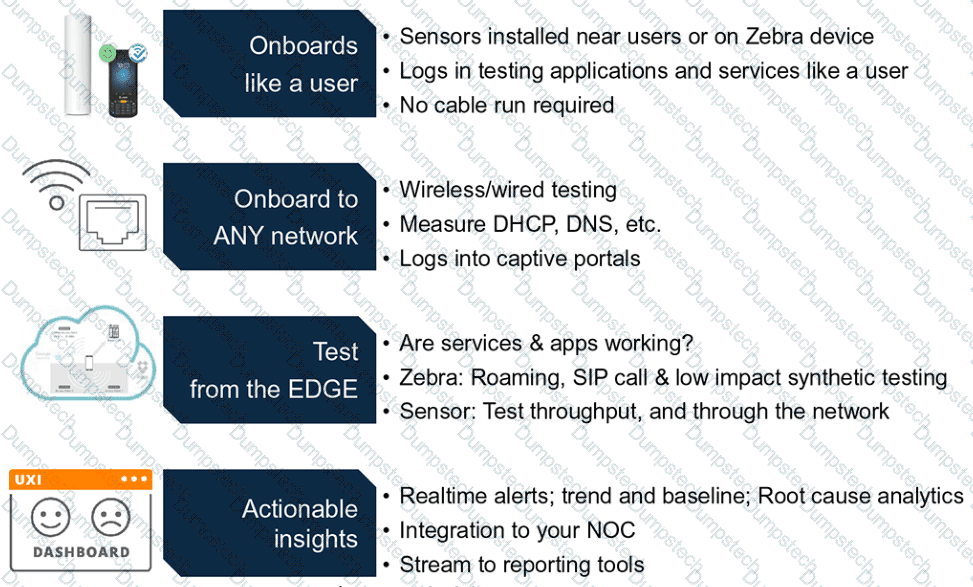
HPE Press study-guide figure / related learning illustration · Q140 Fig 13-39 UXI
When using HPE Aruba Networking Central, which feature identifies recommended actions for resolving network health issues and lets you share detailed information with support personnel?
Options:
Audit Trail
Alerts and Events
AIOps
Overview Dashboard
Comprehensive and Detailed Explanation
HPE Press guide context | PDF page 1018 | HPE Press, Aruba Certified Associate – Campus Access Official Certification Study Guide
Technical Deep Dive — Reconstructed (Original Chat Text Not Recoverable)
Central AIOps integrates AI Insights, AI Search, and AI Assist to detect anomalies, suggest remediation, and collect/share diagnostic evidence for support. Audit Trail records change history; Alerts & Events list conditions; Overview supplies status summaries. The supported AI-driven analysis and remediation guidance are the distinguishing features.
The selected answer corresponds to C: AIOps. This matches the mechanism or management behavior described in the scenario rather than merely a related network feature.
A disciplined investigation compares the observed symptom with expected behavior, tests the most likely failure stage, and verifies recovery rather than assuming that a single command has resolved the problem.
Collecting interface counters, event timestamps, configuration history, and service-test results helps determine whether a symptom originates locally or depends on another device.
The practical deployment consequence is important: a plausible configuration can still fail when the peer interface, device role, licensing scope, or physical medium is mismatched. Checking that surrounding dependency avoids a misleading diagnosis.
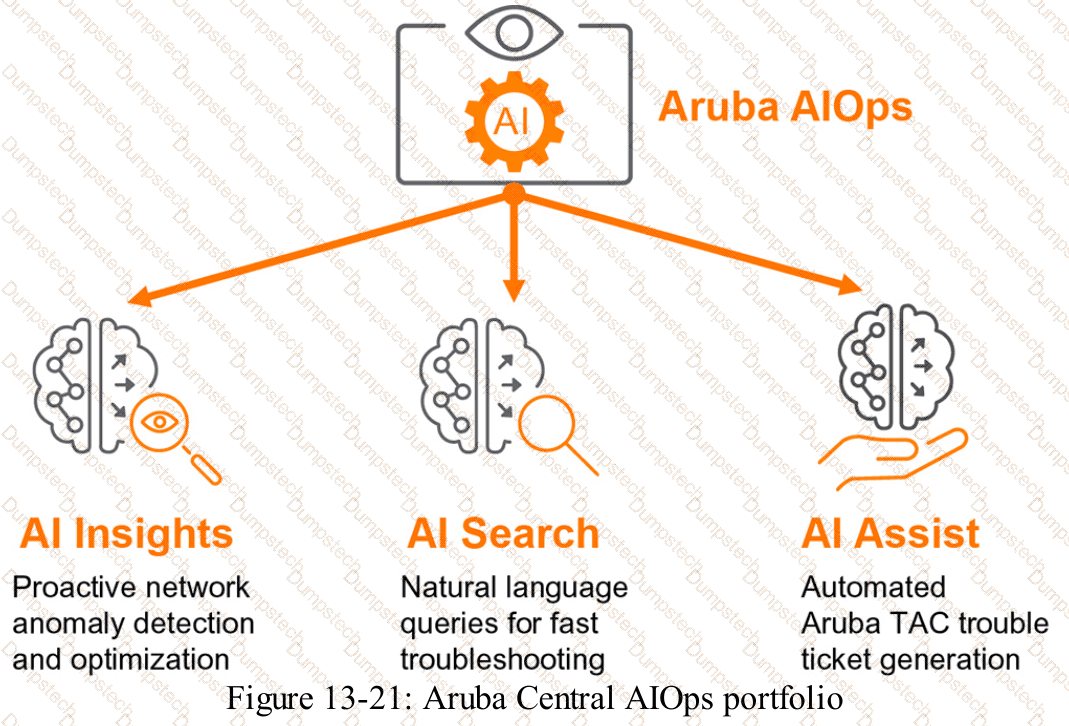
HPE Press study-guide figure / related learning illustration · Q73 AIOps
Modal title
